> ## Documentation Index
> Fetch the complete documentation index at: https://na-36-mintlify-aebde2c5.mintlify.site/llms.txt
> Use this file to discover all available pages before exploring further.

# Daydream Recent Announcements

> Latest videos, socials, and community activity for Daydream.

export const daydreamSocials = [{
  icon: 'globe',
  href: 'https://daydream.live/',
  label: 'Daydream Website'
}, {
  icon: 'github',
  href: 'https://github.com/daydreamlive/scope',
  label: 'Daydream GitHub'
}, {
  icon: 'file-code',
  href: 'https://docs.daydream.live/',
  label: 'Daydream Docs'
}, {
  icon: 'youtube',
  href: 'https://www.youtube.com/channel/UCviyh_-8H2vkYq9ROHMBffQ',
  label: 'Daydream YouTube'
}, {
  icon: 'x-twitter',
  href: 'https://x.com/daydreamlive',
  label: 'Daydream X'
}, {
  icon: 'discord',
  href: 'https://discord.gg/pF2Akym5bV',
  label: 'Daydream Discord'
}, {
  icon: 'instagram',
  href: 'https://www.instagram.com/daydreamlive_/',
  label: 'Daydream Instagram'
}, {
  icon: 'linkedin',
  href: 'https://www.linkedin.com/company/daydreamlive',
  label: 'Daydream LinkedIn'
}];

export const discordAnnouncementsData = [{
  id: "1486303511787602010",
  content: "📣 <strong>Monthly Updates & Retros Are Due!</strong> 📣<br /><br />Please post your February monthly update or retrospective as a reply under your original proposal.<br />For guidance, refer to <a href=\"https://roadmap.livepeer.org/help/articles/8273474-monthly-reports\" target=\"_blank\" rel=\"noopener noreferrer\">the Monthly Update Guide</a> and <a href=\"https://roadmap.livepeer.org/help/articles/8986190-retrospective\" target=\"_blank\" rel=\"noopener noreferrer\">Retro Guide</a>.<br /><br />The following teams have already shared theirs:<br /><ul><li><a href=\"https://forum.livepeer.org/t/transformation-spe-release-notes-closing-retro/3142/7?u=mehrdad\" target=\"_blank\" rel=\"noopener noreferrer\">Transformation SPE Retrospective </a></li><li><a href=\"https://forum.livepeer.org/t/proposal-protocol-r-d-special-purpose-entity/3160/11?u=drieddate_sidestream\" target=\"_blank\" rel=\"noopener noreferrer\">Protocol SPE February Update</a></li><li><a href=\"https://forum.livepeer.org/t/metrics-and-sla-foundations-for-naap/3189/9?u=mehrdad\" target=\"_blank\" rel=\"noopener noreferrer\">Cloud SPE February Update</a></li></ul>",
  author: "_alisonwonderland",
  timestamp: "2026-03-25T09:59:31.394Z",
  url: "https://discord.com/channels/1066890817425387581/1463391944746078319/1486303511787602010"
}, {
  id: "1486303464345702520",
  content: "📣 <strong><u>The CloudSPE proposal is live.</u></strong> 🗳️ 📣 <br /><br />The proposal funds Cloud SPE to build a focused MVP for standardized, publicly observable network performance, reliability, and demand metrics, making the network measurable and comparable while laying the groundwork for future SLA-aware routing and scaling.<br /><br />Vote Yes ✅ or No ❌ <a href=\"https://explorer.livepeer.org/treasury/47675980806842999962173227987422002121354040219792725319563843023665050472833\" target=\"_blank\" rel=\"noopener noreferrer\">here</a>",
  author: "_alisonwonderland",
  timestamp: "2026-03-25T09:59:20.083Z",
  url: "https://discord.com/channels/1066890817425387581/1463391944746078319/1486303464345702520"
}, {
  id: "1486303431873527941",
  content: "📣 <strong><u>Vote now on the Protocol R&D SPE</u></strong> 🗳️ 📣 <br /><br />All network value depends on protocol security. The proposal argues for a dedicated, continuously staffed function for protocol security, upgrades, and core improvements, replacing the current ad hoc model with a single accountable structure.<br /><br />Vote Yes ✅ or No ❌ <a href=\"https://explorer.livepeer.org/treasury/67253869199932483234551664403036205881217777786063955710174984983936506090761\" target=\"_blank\" rel=\"noopener noreferrer\">here</a>",
  author: "_alisonwonderland",
  timestamp: "2026-03-25T09:59:12.341Z",
  url: "https://discord.com/channels/1066890817425387581/1463391944746078319/1486303431873527941"
}, {
  id: "1486303296984453240",
  content: "🦃🦃🦃 <strong><u>November #2 Community Update</u></strong> 🦃🦃🦃<br /><br /><strong>Big Moments</strong><br /><br />📈  Network fees last week were <strong>\$15,826</strong> with a stable fee baseline in November. Participation rate is <br /><strong>51.7%</strong> - <u>a three year high</u>; the inflation rate is decreasing, currently at <strong>0.06835%</strong>.<br /><br /><:daydream:1435328189311488060> Daydream Scope, created by <@380038770520489986>, added LoRA Support in Scope v0.1.0a7. Read more <a href=\"https://github.com/daydreamlive/scope/releases/tag/v0.1.0a7\" target=\"_blank\" rel=\"noopener noreferrer\">here</a>.<br /><br />🔐 The new bot measures has again curbed spam in the server. <strong>Beware of a new tactic - Bots are adding links into their bio.</strong> We are exploring measures to remove these bots. <u>Never click links in the bio of unverified sources.</u><br /><br /><strong>Upcoming Events</strong><br /><br /><a href=\"https://discord.com/events/423160867534929930/1394387798232141996\" target=\"_blank\" rel=\"noopener noreferrer\">Livepeer Fireside</a> - <t:1764180000:R><br /><a href=\"https://discord.com/events/423160867534929930/1394387788568203274\" target=\"_blank\" rel=\"noopener noreferrer\">Watercooler Chat</a> - <t:1764619200:f><br /><br /><strong>Other Updates</strong><br /><br />🟣 <u>Muxion Labs</u><br /><br /><@&1303105760661606450>'s <@488172209823678474> created a new Daydream Comfy Custom Node with an updated interface. If you want to see it in action - watch this week's Watercooler Chat <a href=\"https://youtu.be/9rZh5d_wRlI?t=1753\" target=\"_blank\" rel=\"noopener noreferrer\">here</a>! The link goes directly to the demo timestamp. <br /><br />🏛️ <u>Livepeer Foundation</u><br /><br />Livepeer Foundation has been making progress towards the Transformation SPE goals:<br /><br /><ul><li><@781667568942841866> posted progress on updating our documentation <a href=\"https://forum.livepeer.org/t/rfp-documentation-restructure/3071/11?u=cult_leader_en\" target=\"_blank\" rel=\"noopener noreferrer\">here</a></li><li><@537817645140017153> digested the feedback from the Inflation Survey <a href=\"https://forum.livepeer.org/t/continuing-discussions-on-inflation/3139/4?u=cult_leader_en\" target=\"_blank\" rel=\"noopener noreferrer\">here</a></li><li>Guild has made improvements to the Explorer</li></ul><@&1433161182143053864> members & <@423592125406380042> were in Argentina for DevConnect - See <@543292258980593664> review of the conference <a href=\"https://discord.com/channels/423160867534929930/426106677650128898/1441545466323144734\" target=\"_blank\" rel=\"noopener noreferrer\">https://discord.com/channels/423160867534929930/426106677650128898/1441545466323144734</a><br /><br /><a:campfire:1372208400787832953> <u>Livepeer Fireside</u><br /><br />Watch the most recent Fireside <a href=\"https://www.youtube.com/watch?v=Uw7cdZLx7kA\" target=\"_blank\" rel=\"noopener noreferrer\">here</a>.<br /><br />Last Fireside's agenda:<br /><br /><ul><li><@515896144560128000> from Embody Network updating on progress</li><li><@389895972102209551> from Embody Network presenting Embody AI creator</li></ul>❌ <strong>Missed an event?</strong><br /><br />If you miss any events, check out our <a href=\"https://www.youtube.com/@LivepeerProject\" target=\"_blank\" rel=\"noopener noreferrer\">Youtube here</a>. <br /><br /><strong>Asking again: What do we want for Livepeer in 2026?</strong> Please drop your opinions in <#426106677650128898> 🦃🪞<div style=\"border-left:3px solid var(--accent);padding:8px 12px;margin-top:12px;border-radius:4px\"><a href=\"https://www.youtube.com/watch?v=9rZh5d_wRlI\" target=\"_blank\" rel=\"noopener noreferrer\"><strong>Watercooler Chat | November 24 2025</strong></a><p>Tune into our weekly Watercooler Chat to discuss pressing topics from community members.<br />---<br />Connect with Livepeer on Socials:<br />Twitter: <a href=\"https://twitter.com/Livepeer\" target=\"_blank\" rel=\"noopener noreferrer\">https://twitter.com/Livepeer</a><br />Discord: <a href=\"https://discord.gg/uaPhtyrWsF\" target=\"_blank\" rel=\"noopener noreferrer\">https://discord.gg/uaPhtyrWsF</a><br />Telegram: <a href=\"https://t.me/livepeerorg\" target=\"_blank\" rel=\"noopener noreferrer\">https://t.me/livepeerorg</a><br />Reddit: <a href=\"https://www.reddit.com/r/livepeer/\" target=\"_blank\" rel=\"noopener noreferrer\">https://www.reddit.com/r/livepeer/</a><br />Blog: <a href=\"https://medium.com/livepeer-blog\" target=\"_blank\" rel=\"noopener noreferrer\">https://medium.com/livepeer-blog</a><br />Forum: <a href=\"https://forum...\" target=\"_blank\" rel=\"noopener noreferrer\">https://forum...</a></p><img src=\"https://i.ytimg.com/vi/9rZh5d_wRlI/maxresdefault.jpg\" alt=\"Watercooler Chat | November 24 2025\" style=\"max-width:300px;border-radius:8px;margin-top:8px\" /></div><div style=\"border-left:3px solid var(--accent);padding:8px 12px;margin-top:12px;border-radius:4px\"><a href=\"https://forum.livepeer.org/t/rfp-documentation-restructure/3071/11?u=cult_leader_en\" target=\"_blank\" rel=\"noopener noreferrer\"><strong>RFP - Documentation Restructure</strong></a><p>Hello all!  Thank you for welcoming me at today's Watercooler Chat [Slides here] where I provided a few key Documentation updates, which I'm also sharing below.     Sharing the latest structured update on the Livepeer Documentation Restructure, aligned with the RFP goals outlined here: RFP - Documentation Restructure - #10 by honestly_rich...</p><img src=\"https://canada1.discourse-cdn.com/flex030/uploads/livepeer/original/2X/9/9cdb46d131c2f53e22bfd13cbc572e215b2b636e.png\" alt=\"RFP - Documentation Restructure\" style=\"max-width:300px;border-radius:8px;margin-top:8px\" /></div><div style=\"border-left:3px solid var(--accent);padding:8px 12px;margin-top:12px;border-radius:4px\"><a href=\"https://forum.livepeer.org/t/continuing-discussions-on-inflation/3139/4?u=cult_leader_en\" target=\"_blank\" rel=\"noopener noreferrer\"><strong>Continuing discussions on Inflation</strong></a><p>Quick update on the survey:  We have a good number (25) of results now, so I'll be closing the survey at midnight UTC on Thursday. That means that the last day to fill out the form is Wednesday (in the morning if you're in Argentina).  I'll then synthesise the answers and share a summary here this Friday.   Edit: The survey is now closed. ...</p></div><div style=\"border-left:3px solid var(--accent);padding:8px 12px;margin-top:12px;border-radius:4px\"><a href=\"https://www.youtube.com/watch?v=Uw7cdZLx7kA\" target=\"_blank\" rel=\"noopener noreferrer\"><strong>Livepeer Fireside | November 12 2025</strong></a><p>Join our weekly Fireside where we discuss the most important happenings within our ecosystem. The heavy hitters of the community present their updates. Tap in!<br />---<br />Connect with Livepeer on Socials:<br />Twitter: <a href=\"https://twitter.com/Livepeer\" target=\"_blank\" rel=\"noopener noreferrer\">https://twitter.com/Livepeer</a><br />Discord: <a href=\"https://discord.gg/uaPhtyrWsF\" target=\"_blank\" rel=\"noopener noreferrer\">https://discord.gg/uaPhtyrWsF</a><br />Telegram: <a href=\"https://t.me/livepeerorg\" target=\"_blank\" rel=\"noopener noreferrer\">https://t.me/livepeerorg</a><br />Reddit: <a href=\"https://www.reddit.com/...\" target=\"_blank\" rel=\"noopener noreferrer\">https://www.reddit.com/...</a></p><img src=\"https://i.ytimg.com/vi/Uw7cdZLx7kA/maxresdefault.jpg\" alt=\"Livepeer Fireside | November 12 2025\" style=\"max-width:300px;border-radius:8px;margin-top:8px\" /></div>",
  author: "_alisonwonderland",
  timestamp: "2026-03-25T09:58:40.181Z",
  url: "https://discord.com/channels/1066890817425387581/1463391944746078319/1486303296984453240"
}, {
  id: "1483220726331740373",
  content: "Livepeer #🎙│announcements",
  author: "_alisonwonderland",
  timestamp: "2026-03-16T21:49:38.066Z",
  url: "https://discord.com/channels/1066890817425387581/1463391944746078319/1483220726331740373"
}, {
  id: "1473413137410560030",
  content: "Livepeer #🎙│announcements",
  author: "_alisonwonderland",
  timestamp: "2026-02-17T20:17:46.651Z",
  url: "https://discord.com/channels/1066890817425387581/1463391944746078319/1473413137410560030"
}, {
  id: "1463397885272920138",
  content: "📣 <strong><u>The CloudSPE proposal is live.</u></strong> 🗳️ 📣 <br /><br />The proposal funds Cloud SPE to build a focused MVP for standardized, publicly observable network performance, reliability, and demand metrics, making the network measurable and comparable while laying the groundwork for future SLA-aware routing and scaling.<br /><br />Vote Yes ✅ or No ❌ <a href=\"https://explorer.livepeer.org/treasury/47675980806842999962173227987422002121354040219792725319563843023665050472833\" target=\"_blank\" rel=\"noopener noreferrer\">here</a>",
  author: "_alisonwonderland",
  timestamp: "2026-01-21T05:00:44.467Z",
  url: "https://discord.com/channels/1066890817425387581/1463391944746078319/1463397885272920138"
}, {
  id: "1463397844890288351",
  content: "📣 <strong><u>Vote now on the Protocol R&D SPE</u></strong> 🗳️ 📣 <br /><br />All network value depends on protocol security. The proposal argues for a dedicated, continuously staffed function for protocol security, upgrades, and core improvements, replacing the current ad hoc model with a single accountable structure.<br /><br />Vote Yes ✅ or No ❌ <a href=\"https://explorer.livepeer.org/treasury/67253869199932483234551664403036205881217777786063955710174984983936506090761\" target=\"_blank\" rel=\"noopener noreferrer\">here</a>",
  author: "_alisonwonderland",
  timestamp: "2026-01-21T05:00:34.839Z",
  url: "https://discord.com/channels/1066890817425387581/1463391944746078319/1463397844890288351"
}, {
  id: "1463392024576266301",
  content: "Livepeer #🎙│announcements",
  author: "_alisonwonderland",
  timestamp: "2026-01-21T04:37:27.168Z",
  url: "https://discord.com/channels/1066890817425387581/1463391944746078319/1463392024576266301"
}];

export const daydreamDiscordData = [{
  id: "1486304270428143616",
  content: "<strong>Scope v0.1.9</strong><br />Audio Out is here. Pipelines can now generate and stream audio alongside video over WebRTC.<br /><br />Here's a demo (Audio ON) of storytelling using Longlive for video and Kokoro TTS for audio - running video and audio in 2 separate Scope instances on a single 5090 GPU (running in one Scope instance coming soon).<br /><br /><u>What's in v0.1.9:</u><br /><ul><li><strong>Audio output support</strong>: pipelines can return audio streamed over WebRTC, with a mute/unmute toggle in the UI</li><li><strong>Fix VACE regression</strong>: tempo sync modulation no longer interferes with VACE noise scale (broken in 0.1.8)</li></ul><u>3 sample audio plugins to try:</u><br /><ul><li><a href=\"https://app.daydream.live/nodes/rafal/audio-beep\" target=\"_blank\" rel=\"noopener noreferrer\">audio-beep</a>: simple test tone</li><li><a href=\"https://app.daydream.live/nodes/rafal/kokoro-tts\" target=\"_blank\" rel=\"noopener noreferrer\">kokoro-tts</a>: text-to-speech via Kokoro</li><li><a href=\"https://app.daydream.live/nodes/rafal/mms-tts\" target=\"_blank\" rel=\"noopener noreferrer\">mms-tts</a>: Meta's MMS text-to-speech</li></ul>Grab the update: <a href=\"https://github.com/daydreamlive/scope/releases/tag/v0.1.9?utm_source=discord&utm_medium=release&utm_campaign=v0.1.9\" target=\"_blank\" rel=\"noopener noreferrer\">Scope v0.1.9</a><br /><br /><video src=\"https://cdn.discordapp.com/attachments/1485293172870348811/1486304269521915984/demo_story_hd.mp4?ex=69deb978&is=69dd67f8&hm=2f0432d0389acf1ae51f34eadb663a3bb7c5e1d63406d05573a8d0b072681f94&\" controls width=\"100%\" height=\"auto\" style=\"border-radius:8px;margin-top:12px\"></video>",
  author: "_alisonwonderland",
  timestamp: "2026-03-25T10:02:32.268Z",
  url: "https://discord.com/channels/1066890817425387581/1485293172870348811/1486304270428143616"
}, {
  id: "1486304240484880434",
  content: "<br /><br />Scope workflows can now sync to the beat. Lock your AI visuals to Ableton Link or MIDI clock, modulate parameters on beat boundaries, and cycle prompts with the music.<br /><br />What's in v0.1.8:<br /><ul><li>Tempo sync & beat modulation - quantize parameter changes, sync waveforms to BPM</li><li>MCP server - AI assistants can programmatically control pipelines and parameters</li><li>DMX Art-Net input - map lighting console channels to any Scope parameter</li><li>FPS throttling fix - smoother streaming, no more frame delivery stalls</li></ul>Grab the update: <a href=\"https://github.com/daydreamlive/scope/releases/tag/v0.1.8?utm_source=discord&utm_medium=release&utm_campaign=v0.1.8\" target=\"_blank\" rel=\"noopener noreferrer\">https://github.com/daydreamlive/scope/releases/tag/v0.1.8?utm_source=discord&utm_medium=release&utm_campaign=v0.1.8</a><div style=\"border-left:3px solid var(--accent);padding:8px 12px;margin-top:12px;border-radius:4px\"><a href=\"https://github.com/daydreamlive/scope/releases/tag/v0.1.8?utm_source=discord&utm_medium=release&utm_campaign=v0.1.8\" target=\"_blank\" rel=\"noopener noreferrer\"><strong>Release v0.1.8 · daydreamlive/scope</strong></a><p>This release adds beat-synced parameter modulation with Ableton Link and MIDI clock support, an MCP server for AI-assisted pipeline control, and DMX Art-Net input.<br />Highlights<br /><br />Tempo Sync &amp; Beat...</p><img src=\"https://opengraph.githubassets.com/3e2af7f5287eb903e3bfb3159bf6bf0bc9b55075237c1e2f46b11cdfbda80d0f/daydreamlive/scope/releases/tag/v0.1.8\" alt=\"Release v0.1.8 · daydreamlive/scope\" style=\"max-width:300px;border-radius:8px;margin-top:8px\" /></div>",
  author: "_alisonwonderland",
  timestamp: "2026-03-25T10:02:25.129Z",
  url: "https://discord.com/channels/1066890817425387581/1485293172870348811/1486304240484880434"
}, {
  id: "1486304203495440487",
  content: "<br /><strong>Scope v0.1.6</strong><br /><br />This release ships shareable workflows, OSC control, cloud plugins, and a new logs panel, and more.<br /><br />Some highlights include:<br /><br />Shareable Workflows -- export your full workflow config (plugins, LoRAs, timeline data) as a JSON file and share it with anyone. Recipients import the file and Scope resolves all dependencies automatically. You can also share workflows via deeplink on app.daydream.live: click \"Install Workflow\" and it opens directly in Scope.<br /><br />OSC Support -- control pipeline parameters via OSC.<br /><br />Cloud Plugins -- install whitelisted plugins in cloud mode. Plugins are cleaned up between sessions automatically.<br /><br />Logs Panel -- cloud server logs now stream to the client in real time. A new log panel (toggle from the status bar) shows all logs with filters for errors and cloud-specific lines.<video src=\"https://cdn.discordapp.com/attachments/1485293172870348811/1486304203218620499/scope_demo.mp4?ex=69deb968&is=69dd67e8&hm=e3080098248db62039547d18f8186f475b598f5c61bc555f6e2cdda9d3823e37&\" controls width=\"100%\" height=\"auto\" style=\"border-radius:8px;margin-top:12px\"></video>",
  author: "_alisonwonderland",
  timestamp: "2026-03-25T10:02:16.310Z",
  url: "https://discord.com/channels/1066890817425387581/1485293172870348811/1486304203495440487"
}, {
  id: "1486304160373669948",
  content: "<br />📣 <strong>AI Video Program - Cohort 3 is open!</strong><br /><br />If you're working in TouchDesigner, Resolume, or any other video software and want to bring real-time AI into your work - this is for you.<br /><br /><strong>What you'll learn & build:</strong><br />-> Run real-time AI video models locally or via remote inference<br />-> Build AI pipelines alongside TouchDesigner, Resolume & ComfyUI<br />-> Use LoRA models and plugins for custom generative visuals<br />-> Get feedback through live workshops and daily office hours with the Daydream team + guest experts<br /><br /><strong>The program:</strong><br />📅 2 weeks (March 9-20) + Demo Day March 25<br />🏆 \$5K in prizes<br />🎥 All sessions recorded - no timezone pressure<br />👥 Cohort of 20-30 practitioners building alongside you<br /><br /><strong>Applications close March 7. Starts March 9.</strong><br /><br />➡️ <a href=\"http://daydream.live/interactive-ai-video-program/?utm_source=dm&utm_medium=personal&utm_campaign=c3_recruitment&utm_content=andrew\" target=\"_blank\" rel=\"noopener noreferrer\">Apply Here</a> ⬅️<br /><br />Drop any questions below or DM us - happy to help!<div style=\"border-left:3px solid var(--accent);padding:8px 12px;margin-top:12px;border-radius:4px\"><a href=\"http://daydream.live/interactive-ai-video-program/?utm_source=dm&utm_medium=personal&utm_campaign=c3_recruitment&utm_content=andrew\" target=\"_blank\" rel=\"noopener noreferrer\"><strong>Daydream Interactive AI Video Program | Daydream</strong></a><p>Daydream's Interactive AI Video Program is a two‑week creative lab for AI artists, creative technologists, and developers exploring real‑time AI video with Daydream Scope.</p><img src=\"https://framerusercontent.com/assets/TRBB5uP8yeHi3MRo6y5nItnjxHY.png\" alt=\"Daydream Interactive AI Video Program | Daydream\" style=\"max-width:300px;border-radius:8px;margin-top:8px\" /></div>",
  author: "_alisonwonderland",
  timestamp: "2026-03-25T10:02:06.029Z",
  url: "https://discord.com/channels/1066890817425387581/1485293172870348811/1486304160373669948"
}, {
  id: "1485293511329972325",
  content: "Daydream Live #🌑〻announcements",
  author: "_alisonwonderland",
  timestamp: "2026-03-22T15:06:08.520Z",
  url: "https://discord.com/channels/1066890817425387581/1485293172870348811/1485293511329972325"
}];

export const daydreamBlogData = [{
  title: `What is hosted StreamDiffusion, and why TouchDesigner creators should care`,
  href: `https://blog.daydream.live/what-is-hosted-streamdiffusion-and-why-touchdesigner-creators-should-care/`,
  author: `By Daydream Team`,
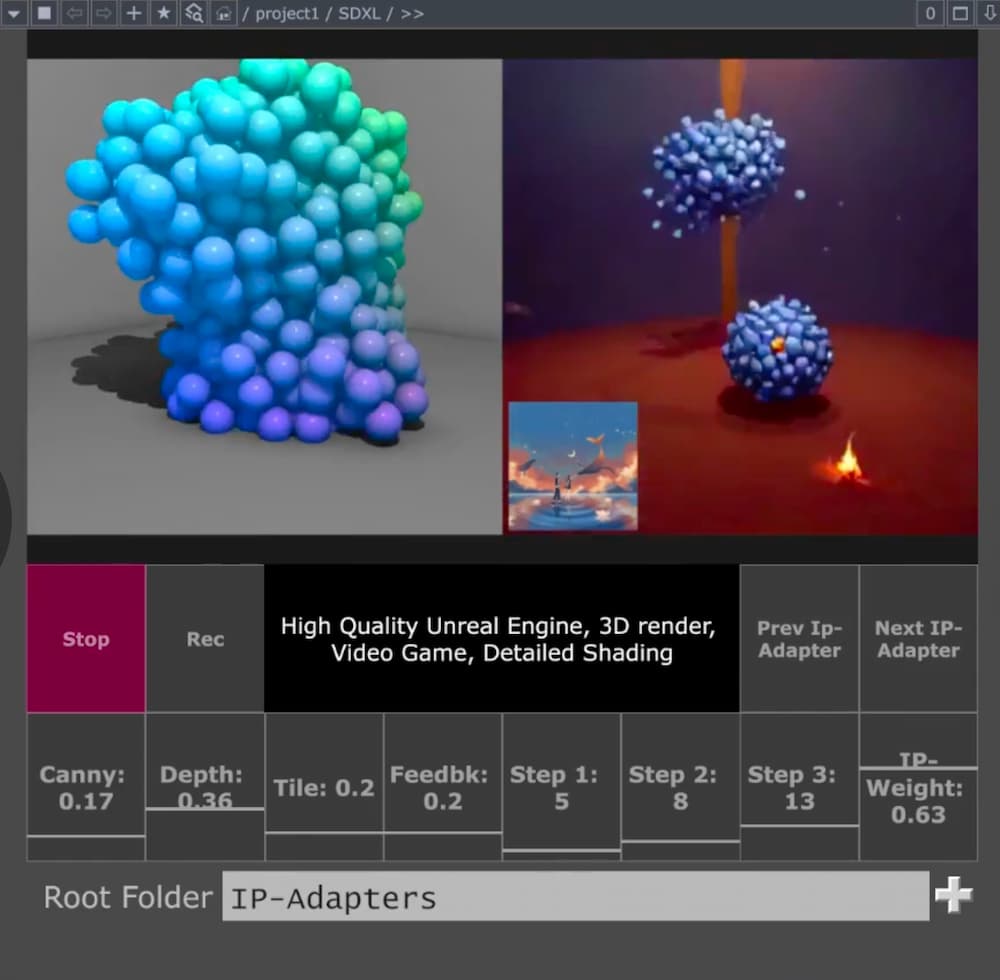
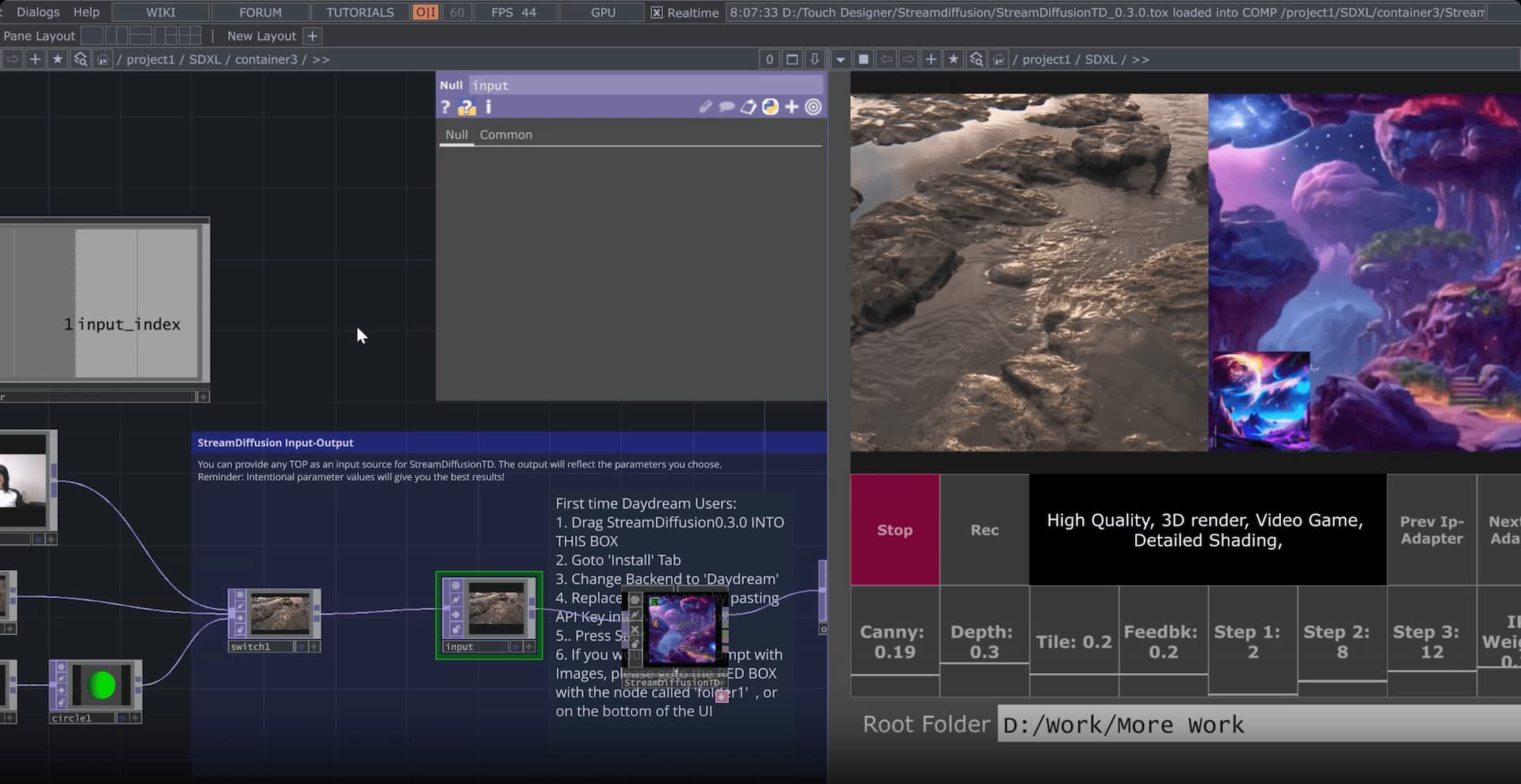
  content: `<p>Hosted StreamDiffusion is Daydream&apos;s managed version of the open-source StreamDiffusion real-time diffusion pipeline, wired directly into TouchDesigner through the Daydream API. </p><p>The short version: you run the StreamDiffusionTD plugin exactly the way you always have, but the actual generation work happens on our GPUs instead of yours. You need no local NVIDIA card, Python environment, CUDA install, and there&apos;s no Windows-only lockdown. </p><p>As of April 2026, it&apos;s the path most TouchDesigner creators on macOS are using to work with StreamDiffusion at all, and the one our team at Daydream has been pushing hardest since the API went live in August 2025.</p><p>StreamDiffusionTD, the operator that made StreamDiffusion usable in a TouchDesigner network in the first place, has been the fastest way to get real-time AI video running inside TouchDesigner since late 2023. </p><p>The catch was always the same one: you needed a serious Windows machine with an NVIDIA GPU to run it at performance quality, which ruled out every TouchDesigner user on a Mac and a good chunk of creators who just didn&apos;t want to carry an RTX 4090 or 5090 to every gig.</p><p>Hosted StreamDiffusion fixes that. The same StreamDiffusionTD plugin now runs against the Daydream API&apos;s remote GPU, so you get real-time video generation inside TouchDesigner without any of the local hardware or Python setup. If you&apos;ve been watching StreamDiffusion tutorials from the sidelines because your laptop wouldn&apos;t run them, that&apos;s over now.</p><blockquote><strong>Want to skip the context and just try it?</strong>&#xA0;The&#xA0;<a href="https://daydream.live/streamdiffusiontd?utm_source=daydream&amp;utm_medium=web&amp;utm_campaign=streamdiffusiontd-blog&amp;utm_content=inline-cta">hosted StreamDiffusion page on daydream.live</a>&#xA0;has the quickstart file, a free API key flow, and more relevant details. The rest of this post is for when you want to understand what actually changed and why it matters for TouchDesigner creators specifically.</blockquote><h2 id="a-quick-history-of-streamdiffusiontd"><strong>A quick history of StreamDiffusionTD</strong></h2><p>Credit where it&apos;s due.&#xA0;<a href="https://dotsimulate.com/about?ref=blog.daydream.live">Lyell Hintz</a>, known in the TouchDesigner community as&#xA0;<a href="https://x.com/dotsimulate?ref=blog.daydream.live">dotsimulate</a>, built&#xA0;<a href="https://dotsimulate.com/docs/streamdiffusiontd?ref=blog.daydream.live">StreamDiffusionTD</a>&#xA0;a few hours after the original StreamDiffusion research pipeline hit GitHub in late December 2023. His first public demo was an audio-reactive setup posted to X, and the tool has been shipping through his&#xA0;<a href="https://www.patreon.com/posts/streamdiffusiont-96323080?ref=blog.daydream.live">Patreon</a>&#xA0;ever since. It&apos;s now on version 0.3.1 with SDXL-Turbo, multi-ControlNet, IP Adapter with FaceID, and a long list of other creative workflows that the community has helped shape through fixes and feature requests.</p><p>The reason it caught on is that Lyell approached the project like someone who actually uses TouchDesigner to make things. In a&#xA0;<a href="https://blog.daydream.live/builder-story-dotsimulate-x-daydream/?utm_source=daydream&amp;utm_medium=web&amp;utm_campaign=streamdiffusiontd-blog&amp;utm_content=builder-story-narrative">conversation with the Daydream team</a>&#xA0;he put it simply: </p><blockquote>&quot;TouchDesigner is the only place this could be controlled from. It can hook into everything else.&quot; </blockquote><p>The operator exposes the parameters that matter for live work (prompt, seed, ControlNet weights) instead of hiding them behind a black box, so you can drive generation from audio, sensors, cameras, MIDI, OSC, or whatever else you already have wired up.</p><h2 id="running-it-locally-has-never-been-easy"><strong>Running it locally has never been easy</strong></h2><p>The tradeoff Lyell couldn&apos;t fix from inside TouchDesigner was the hardware requirement. The local version of StreamDiffusionTD needs Windows 10 or 11, an NVIDIA GPU with CUDA support, at least 6 GB of VRAM (24 GB recommended for the full feature set), Python 3.10 or 3.11, and a matching CUDA toolchain. </p><p>Apple Silicon Macs are out entirely because the upstream StreamDiffusion pipeline has no MPS path, so Mac TouchDesigner users have been watching the tutorials and reading the forum threads without being able to run the thing on their own hardware.</p><p>Even when you do have the right machine, the performance curve is steep.&#xA0;<a href="https://interactiveimmersive.io/blog/artificial-intelligence/using-streamdiffusion-with-touchdesigner/?ref=blog.daydream.live">The Interactive &amp; Immersive HQ</a>&#xA0;benchmarked StreamDiffusionTD at 55 to 60 frames per second on an RTX 4090, dropping to around 16 fps on a 3060 12 GB, and falling to roughly 4 fps above 1024&#xD7;1024 (closer to a slideshow than live animation). A&#xA0;<a href="https://derivative.ca/tags/streamdiffusion-td?ref=blog.daydream.live">community pricing anchor on Derivative</a>&#xA0;put the real number on what it actually takes to do pro work with the local setup:</p><blockquote> &quot;\$3,000+ RTX 4090/5090 GPU workstation.&quot; </blockquote><p>For a touring VJ or an installation artist quoting a commission, that&apos;s a line item you can&apos;t always justify, and it&apos;s one you definitely can&apos;t drag into the green room at a festival.</p><h2 id="what-hosted-streamdiffusion-actually-changes"><strong>What hosted StreamDiffusion actually changes</strong></h2><figure class="kg-card kg-image-card"><img src="https://storage.ghost.io/c/ee/84/ee847f83-2527-4049-945e-511415a6b18b/content/images/2026/04/streamdifussiontd-hosted-daydream.jpg" class="kg-image" alt="What is hosted StreamDiffusion, and why TouchDesigner creators should care" loading="lazy" width="1000" height="980" sizes="(min-width: 720px) 720px"></figure><p>Hosted StreamDiffusion moves all of that inference to the Daydream API. The plugin stays where it&apos;s always been, inside TouchDesigner, on your canvas. The actual diffusion work just happens on Daydream&apos;s GPUs instead of yours. You drop your API key into the operator, hit Start Stream, and you&apos;re generating. The whole setup, as Lyell put it in that same conversation,&#xA0;<a href="https://blog.daydream.live/builder-story-dotsimulate-x-daydream/?utm_source=daydream&amp;utm_medium=web&amp;utm_campaign=streamdiffusiontd-blog&amp;utm_content=builder-story-setup">takes less than a minute</a>.</p><p>The list of things you stop needing is the interesting part. You don&apos;t need Windows. You don&apos;t need an NVIDIA GPU. You don&apos;t need a Python environment or a matching CUDA toolchain. You don&apos;t need to download model weights, and you don&apos;t need to keep them up to date. What you do need is a free API key from the&#xA0;<a href="https://docs.daydream.live/api/introduction?utm_source=daydream&amp;utm_medium=web&amp;utm_campaign=streamdiffusiontd-blog&amp;utm_content=api-introduction">Daydream Builder Dashboard</a>&#xA0;and a machine that can run TouchDesigner and reach the internet. On top of that, the hosted path enables features that are hard or expensive to run locally (multi-ControlNet, IP Adapter with FaceID, TensorRT acceleration), and every parameter stays adjustable in real time while your stream is live.</p><p>The biggest shift is cultural more than it is technical. For the first time, the Mac TouchDesigner community isn&apos;t shut out of StreamDiffusion work. If you&apos;ve been building generative systems on an M-series MacBook Pro, you can pipe them through hosted diffusion and back into your network the same way a Windows creator with a 4090 or 5090 in the tower would, without changing operating systems or buying new hardware. </p><p>We&apos;ve felt that shift directly on our end: the questions we used to get started with &quot;what GPU do I need to buy,&quot; and the shift to &quot;what should I prompt.&quot;</p><h2 id="what-this-looks-like-in-practice"><strong>What this looks like in practice</strong></h2><figure class="kg-card kg-image-card"><img src="https://storage.ghost.io/c/ee/84/ee847f83-2527-4049-945e-511415a6b18b/content/images/2026/04/streamdifussiontd-daydream.jpg" class="kg-image" alt="What is hosted StreamDiffusion, and why TouchDesigner creators should care" loading="lazy" width="1920" height="990" sizes="(min-width: 720px) 720px"></figure><p><strong>If you&apos;re a VJ cutting live visuals</strong>, you can drive the StreamDiffusion pipeline from whatever audio-reactive logic you already have in TouchDesigner (CHOPs, particle systems, camera feeds, MIDI from the DJ booth) and have the AI output appear at frame rates that actually sit inside a live set. No pre-rendering, no offline passes, just real-time generation sitting next to your other sources in the mix.</p><p><strong>If you&apos;re an installation artist</strong>, the interesting bit is that the inference is no longer tied to a machine on site. A small Mac running TouchDesigner and calling the Daydream API is a very different shipping and power footprint than a workstation with a 4090 or 5090 in it, and a lot easier to keep stable across a multi-week exhibit.</p><p><strong>If you&apos;re doing projection mapping or LED work</strong>, the hosted path frees up your local GPU for the things TouchDesigner is already good at (shaders, warping, geometry) while the diffusion happens somewhere else. You stop having to choose between &quot;the mapping runs smoothly&quot; and &quot;the AI runs smoothly.&quot;</p><p><strong>If you&apos;re on macOS</strong>, this is the first time StreamDiffusionTD has been available to you at all, and the setup isn&apos;t a workaround. It runs the same way it would on any other machine that can call the Daydream API, with the same features and the same control surface.</p><h2 id="where-to-start"><strong>Where to start</strong></h2><p>The fastest way in, and the one we&apos;ve been recommending to pretty much every TouchDesigner creator who asks, is <a href="https://app.daydream.live/creators/as.ws__/daydream-sdxl-easy-quickstart-file?utm_source=daydream&amp;utm_medium=web&amp;utm_campaign=streamdiffusiontd-blog&amp;utm_content=quickstart-file">Daydream SDXL Easy Quickstart File</a>. It&apos;s a ready-to-use .tox that wires StreamDiffusionTD to your Daydream API key with a click-and-drag install, and it gives you real-time prompt editing, multiple ControlNets, IP-Adapter image prompting from folders, and input switching for webcam, video files, and TouchDesigner network sources out of the box. It needs TouchDesigner 2023 or newer on Mac, and 2025 or newer on Windows for the SDXL Turbo path.</p><p>If you want the full story, the&#xA0;<a href="https://daydream.live/streamdiffusiontd?utm_source=daydream&amp;utm_medium=web&amp;utm_campaign=streamdiffusiontd-blog&amp;utm_content=landing-page">hosted StreamDiffusion landing page on daydream.live</a>&#xA0;walks through the integration, the model features, and the FAQ.</p><p>Lyell&apos;s own&#xA0;<a href="https://dotsimulate.com/docs/streamdiffusiontd?ref=blog.daydream.live">StreamDiffusionTD documentation</a>&#xA0;is where to go for plugin details and release notes. The&#xA0;<a href="https://blog.daydream.live/builder-story-dotsimulate-x-daydream/?utm_source=daydream&amp;utm_medium=web&amp;utm_campaign=streamdiffusiontd-blog&amp;utm_content=builder-story-further-reading">Daydream builder story on dotsimulate</a>&#xA0;is worth reading for the origin narrative in his own voice, and if you want a primer on what StreamDiffusion actually does under the hood, our&#xA0;<a href="https://blog.daydream.live/real-time-generative-art-a-guide-to-streamdiffusion-and-touchdesigner/?utm_source=daydream&amp;utm_medium=web&amp;utm_campaign=streamdiffusiontd-blog&amp;utm_content=streamdiffusion-guide">earlier guide to StreamDiffusion and TouchDesigner</a>&#xA0;covers the technical layer.</p><h2 id="where-this-fits"><strong>Where this fits</strong></h2><p>Hosted StreamDiffusion for TouchDesigner is one of a handful of paths Daydream already offers creatives who want real-time AI video to live inside the tools they already work in.</p><p>The other main one is&#xA0;<a href="https://daydream.live/?utm_source=daydream&amp;utm_medium=web&amp;utm_campaign=streamdiffusiontd-blog&amp;utm_content=scope">Scope</a>, our local-first desktop app for building real-time video and world-model workflows. Scope is free and open source, with the full source on&#xA0;<a href="https://github.com/daydreamlive/scope?ref=blog.daydream.live">GitHub</a>.</p><p>Where Scope earns its place is in how it talks to the rest of your rig. It ships with a node-based editor and native integrations for&#xA0;<a href="https://blog.daydream.live/spout-and-syphon-in-scope-zero-latency-on-your-machine/?utm_source=daydream&amp;utm_medium=web&amp;utm_campaign=streamdiffusiontd-blog&amp;utm_content=spout-syphon-post">Spout and Syphon</a>,&#xA0;<a href="https://blog.daydream.live/ndi-in-scope-your-real-time-ai-video-across-the-network-and-beyond/?utm_source=daydream&amp;utm_medium=web&amp;utm_campaign=streamdiffusiontd-blog&amp;utm_content=ndi-post">NDI</a>,&#xA0;<a href="https://blog.daydream.live/osc-scope-precision-real-time-ai-video-control-network/?utm_source=daydream&amp;utm_medium=web&amp;utm_campaign=streamdiffusiontd-blog&amp;utm_content=osc-post">OSC</a>,&#xA0;<a href="https://blog.daydream.live/midi-in-scope-hands-on-real-time-ai-video-control/?utm_source=daydream&amp;utm_medium=web&amp;utm_campaign=streamdiffusiontd-blog&amp;utm_content=midi-post">MIDI</a>, and&#xA0;<a href="https://blog.daydream.live/dmx-in-scope-from-real-time-ai-video-pixels-to-photons/?utm_source=daydream&amp;utm_medium=web&amp;utm_campaign=streamdiffusiontd-blog&amp;utm_content=dmx-post">DMX</a>. Those are the same protocols that already run your show control, your lighting rig, and your audio network, which means Scope can sit inside a live production pipeline without a bunch of glue code.</p><p>Scope is what you reach for when you want a purpose-built environment that runs your show control alongside the generation. StreamDiffusionTD on the Daydream API is what you reach for when you want StreamDiffusion sitting inside the TouchDesigner network you&apos;ve already wired up. Both share the same underlying idea: put real-time video generation in TouchDesigner, in Scope, or wherever else you work, within reach of working creatives without forcing them to change their toolchain or pour the cost of a touring rig into an RTX 4090 or 5090 workstation.</p><p>Between them, the audience for real-time diffusion in live visual work stops being &quot;people with a top-end NVIDIA GPU&quot; and starts being anyone with a laptop and a project to ship.</p><h2 id="common-questions"><strong>Common questions</strong></h2><p><strong>Do I still need the StreamDiffusionTD plugin to use hosted StreamDiffusion?</strong></p><p>Yes. The plugin is still the interface inside TouchDesigner. Hosted StreamDiffusion moves the diffusion inference to the Daydream API, but you still install dotsimulate&apos;s StreamDiffusionTD operator to drive prompts, parameters, inputs, and outputs from your network. The plugin and the hosted backend are complementary, not alternatives.</p><p><strong>Does hosted StreamDiffusion work on a Mac?</strong></p><p>Yes, and this is the main new capability. Any Mac that can run TouchDesigner will run StreamDiffusionTD against the Daydream API. Local StreamDiffusion has never been possible on macOS because the upstream pipeline has no Apple Metal path. Hosted changes that entirely, since the inference runs on our GPUs in the cloud rather than your machine. If you&apos;re on Apple Silicon, this is the first time you&apos;ve had a real way to run StreamDiffusion in TouchDesigner.</p><p><strong>What TouchDesigner version do I need?</strong></p><p>Andrew Sun&apos;s Daydream SDXL Easy Quickstart File works with TouchDesigner 2023 or newer on Mac and 2025 or newer on Windows. If you&apos;re running your own StreamDiffusionTD install without the quickstart file, check&#xA0;<a href="https://dotsimulate.com/docs/streamdiffusiontd?ref=blog.daydream.live">dotsimulate&apos;s documentation</a>&#xA0;for the version matrix and release notes.</p><p><strong>How is hosted StreamDiffusion different from Daydream Scope?</strong></p><p>Scope is an open-source desktop app with a node-based editor and native integrations for Spout, Syphon, NDI, OSC, MIDI, and DMX, built for creators who want a dedicated real-time AI video environment that talks directly to their show control. Hosted StreamDiffusion in TouchDesigner is the TouchDesigner-native entry point into the same Daydream API infrastructure. You&apos;d pick Scope if you want the purpose-built environment. You&apos;d pick hosted StreamDiffusion if you already live inside TouchDesigner and want StreamDiffusion to sit there too.</p><p>If you&apos;re building something on either path, we&apos;d love to see it. Tag&#xA0;<a href="https://x.com/daydreamliveai?ref=blog.daydream.live">@daydreamliveai</a>&#xA0;and come hang out with the rest of the community in our&#xA0;<a href="https://discord.gg/pF2Akym5bV?ref=blog.daydream.live">Discord</a>.</p>`,
  datePosted: `Apr 11, 2026`,
  img: `https://storage.ghost.io/c/ee/84/ee847f83-2527-4049-945e-511415a6b18b/content/images/2026/04/hosted-streamdiffusion-touchdesigner.jpg`,
  excerpt: `Hosted StreamDiffusion is Daydream&apos;s managed version of the open-source StreamDiffusion real-time diffusion pipeline, wired directly into TouchDesigner through the Daydream API. The short version: you run the StreamDiffusionTD plugin exactly the way you always have, but the actual generation work happens on our GPUs instead of yours. You need no local NVIDIA card, Python environment, CUDA install, and there&apos;s no Windows-only lockdown. As of April 2026, it&apos;s the path most TouchDesi`,
  readingTime: 9
}, {
  title: `Vibe code with Scope: introducing the Scope Developer Skill for Claude Code`,
  href: `https://blog.daydream.live/vibe-code-with-scope-introducing-the-scope-developer-skill-for-claude-code/`,
  author: `By Daydream Team`,
  content: `<p>Scope is open source, and we&apos;re seeing more and more people build around it. </p><p>Some are writing custom nodes that bring new visual effects into their generation pipeline. Others are connecting Scope to TouchDesigner and Resolume for interactive installations, or scripting their lighting desks to drive AI video generation during live shows. A few have built full applications that stream Scope&apos;s real-time AI video into their own web experiences, Unity projects, or interactive kiosks using WebRTC.</p><p>A lot of this development happens with AI coding agents now, and that&apos;s where things get challenging. Coding agents can still sometimes hallucinate. They guess at endpoint names that look plausible but don&apos;t exist. They generate import paths that fail silently. When you&apos;re building against a codebase that moves as fast as Scope does, your agent&apos;s training data is almost always behind.</p><p>We want to change that and help out. </p><p>Today, we&apos;re launching the&#xA0;<a href="https://github.com/daydreamlive/scope-dev-skill?utm_source=blog&amp;utm_medium=web&amp;utm_campaign=scope-dev-skill">Scope Developer Skill</a>, a purpose-built reference for Claude Code (and likely can be used with Codex and other agentic platforms supporting skills) that gives your coding agent deep knowledge of the Scope platform. It&apos;s one of our first steps toward making AI-assisted development around Scope a first-class experience, and it builds on our LLM-friendly docs we introduced a while ago. More on both in this post.</p><h2 id="reasons-for-building-this">Reasons for building this</h2><p>A lot of people use Scope through the graph editor and the visual controls, and that&apos;s great. But we&apos;re also seeing people who want to go further: writing their own nodes, building custom applications, integrating Scope into larger production setups for live shows and installations. Those people are, in most cases, working with the API, the node system, the WebRTC signaling layer, and their coding agents need to know how all of that works.</p><p>Several of our previous cohort participants have already been building custom nodes using our&#xA0;<a href="https://docs.daydream.live/scope/tutorials/vibe-code-a-scope-plugin?utm_source=blog&amp;utm_medium=web&amp;utm_campaign=scope-dev-skill">vibe coding tutorial</a>. </p><p>The skill takes that further. Instead of spending time figuring out which import path works or what the WebRTC response format looks like, your agent already knows. You describe what you want to build, and the code it produces actually runs.</p><h2 id="what-the-scope-developer-skill-is">What the Scope Developer Skill is</h2><p>In simplest terms, Claude Code&#xA0;<a href="https://docs.anthropic.com/en/docs/claude-code/skills?utm_source=blog&amp;utm_medium=web&amp;utm_campaign=scope-dev-skill">skills</a>&#xA0;are markdown files that give Claude domain-specific expertise. That&apos;s it.</p><p>When you install a skill, Claude automatically loads it whenever the conversation topic matches. You don&apos;t need to remember to paste documentation into context or point your agent at the right files. The skill loads on its own, and it&apos;s structured for code generation rather than human reading: working code examples, exact field names, verified import paths, and cross-cutting patterns like the full WebRTC flow that spans multiple endpoints and models. Copying a docs page gives your agent information about one topic. The skill gives it a connected understanding of how the pieces fit together.</p><p>The&#xA0;<a href="https://github.com/daydreamlive/scope-dev-skill?utm_source=blog&amp;utm_medium=web&amp;utm_campaign=scope-dev-skill">Scope Developer Skill</a>&#xA0;covers a wide range of the Scope platform:</p><ul><li><strong>REST API endpoints</strong>&#xA0;(67 at the time of writing) with HTTP methods, paths, and request/response formats</li><li><strong>WebRTC signaling flow</strong>&#xA0;with working JavaScript examples for text-to-video and video-to-video connections</li><li><strong>Node and pipeline development</strong>&#xA0;with a working pyproject.toml, the build system, the pipeline base class, config schemas, and the plugin registration pattern</li><li><strong>MCP tools</strong>&#xA0;(39 currently) for headless pipeline control</li><li><strong>Runtime parameter reference</strong>&#xA0;with field names, types, ranges, and defaults for real-time control</li><li><strong>Graph execution schema</strong>&#xA0;for multi-pipeline workflows</li><li><strong>OSC, MIDI, and DMX</strong>&#xA0;endpoint formats for show control integration</li><li><strong>Source code map</strong>&#xA0;pointing to backend and frontend files so Claude knows where to look</li></ul><p>We built this by cross-referencing against the actual Scope source code, testing import paths, verifying endpoint methods, and checking field names against the codebase. </p><p>As Scope itself, the skill is&#xA0;<a href="https://github.com/daydreamlive/scope-dev-skill?utm_source=blog&amp;utm_medium=web&amp;utm_campaign=scope-dev-skill">open source on GitHub</a>.</p><h2 id="building-with-scope-and-our-dev-skill">Building with Scope and our dev skill</h2><p>Scenarios are almost endless, but some of the use cases we already observed are listed here. We hope to see even more and beyond these!</p><p><strong>Custom visual effects for your set.</strong>&#xA0;You want a chromatic aberration effect or a CRT scanline look for your VJ performance. Describe the effect, and Claude generates a working plugin you can install and tweak in real time. The skill handles the boilerplate: the build configuration, the plugin registration, the input/output contracts. You focus on the creative part.</p><p><strong>New pipeline support.</strong>&#xA0;Maybe there&apos;s a new audio or video diffusion model or a specialized depth estimation architecture you want to bring into Scope that isn&apos;t supported out of the box. The skill knows the pipeline interface, the config schema, how model artifacts and downloads work, and how to register everything through the plugin system. </p><p>Your agent can scaffold the full pipeline node with the right structure, and you focus on the model-specific inference logic. This is the kind of task where coding agents typically fail without proper context, and it&apos;s where the skill helps the most.</p><p><strong>Your own applications powered by Scope.</strong>&#xA0;Bring real-time AI video into your Unity project, your web experience, your installation kiosk, or your own custom interface. The skill covers the WebRTC signaling details that agents typically get wrong: the field name casing, the ICE candidate format, the data channel protocol. So, instead of reverse-engineering the connection flow from source code, you describe what you want and get working integration code.</p><p><strong>Show control from your existing rig.</strong>&#xA0;Your TouchOSC surface talks to Scope over OSC. Your lighting console drives AI generation over DMX. Your MIDI controller maps to generation parameters. The skill knows these protocol formats and endpoint contracts, so the code your agent writes actually connects to Scope instead of targeting an API surface that doesn&apos;t exist.</p><p><strong>Custom solutions on top of Scope&apos;s engine.</strong>&#xA0;Build your own automation: load pipelines, update prompts with smooth transitions, capture frames, read performance metrics. If you want to build tools that treat Scope as an inference backend rather than a standalone application, the session API is how you do it, and the skill covers it.</p><h2 id="installing-the-skill-in-claude-code">Installing the skill in Claude Code</h2><p>Installation takes about 30 seconds. You have two options depending on whether you want the skill available across all your projects or just one.</p><p><strong>For all your projects</strong>&#xA0;(personal installation):</p><pre><code class="language-bash">git clone https://github.com/daydreamlive/scope-dev-skill.git
cp -r scope-dev-skill/skills/scope-dev ~/.claude/skills/scope-dev
</code></pre><p>If you want it to stay up to date automatically when we push updates, use a symlink instead:</p><pre><code class="language-bash">git clone https://github.com/daydreamlive/scope-dev-skill.git ~/scope-dev-skill
ln -s ~/scope-dev-skill/skills/scope-dev ~/.claude/skills/scope-dev
</code></pre><p>Then whenever we update the skill, a&#xA0;<code>git pull</code>&#xA0;in that directory is all you need.</p><p><strong>For a single project:</strong></p><pre><code class="language-bash">mkdir -p .claude/skills
git clone https://github.com/daydreamlive/scope-dev-skill.git /tmp/scope-dev-skill
cp -r /tmp/scope-dev-skill/skills/scope-dev .claude/skills/scope-dev
</code></pre><p>Once installed, Claude Code picks it up automatically. You can verify by asking something like &quot;How do I load a pipeline via the Scope API?&quot; and checking that Claude references specific endpoints with correct request formats rather than guessing.</p><h2 id="getting-started-and-using-mcp-for-an-even-better-experience">Getting started and using MCP for an even better experience</h2><ol><li><a href="https://github.com/daydreamlive/scope-dev-skill?utm_source=blog&amp;utm_medium=web&amp;utm_campaign=scope-dev-skill">Install the Scope Developer Skill</a>&#xA0;using the instructions above</li><li>For the latest docs on the fly, you can also add&#xA0;<a href="https://context7.com/?ref=blog.daydream.live">Context7</a>, an MCP server from Upstash that lets your agent query Scope&apos;s documentation in real time. The skill gives your agent structure and patterns, MCP gives it freshness. They work well together, but the skill is where we&apos;d start. Install it with:&#xA0;<code>claude mcp add context7 -- npx -y @upstash/context7-mcp@latest</code></li><li>Start building</li></ol><p>If you want a guided walkthrough to see the skill in action, we have two tutorials that pair well with it:</p><ul><li><a href="https://docs.daydream.live/scope/tutorials/build-video-effects-plugin?utm_source=blog&amp;utm_medium=web&amp;utm_campaign=scope-dev-skill">Build a Video Effects Node</a>&#xA0;walks you through creating a GPU-accelerated visual effects plugin from scratch</li><li><a href="https://docs.daydream.live/scope/tutorials/vibe-code-a-scope-plugin?utm_source=blog&amp;utm_medium=web&amp;utm_campaign=scope-dev-skill">Vibe Code a Scope Plugin</a>&#xA0;covers two AI-assisted approaches to building nodes</li></ul><p>We are aware that this is a V1 (if we are being generous about versioning), and we want it to get better with input from the people who actually use it. </p><p>If you build something with the skill, share it in the&#xA0;<a href="https://discord.gg/pF2Akym5bV?ref=blog.daydream.live">Discord</a>. If something&apos;s wrong or missing,&#xA0;<a href="https://github.com/daydreamlive/scope-dev-skill/issues?utm_source=blog&amp;utm_medium=web&amp;utm_campaign=scope-dev-skill">open an issue on GitHub</a>.</p><p>Happy building, we are excited to see what you (vibe) code with Scope!</p><h2 id="some-useful-links">Some useful links</h2><ul><li><a href="https://github.com/daydreamlive/scope-dev-skill?utm_source=blog&amp;utm_medium=web&amp;utm_campaign=scope-dev-skill">Scope Developer Skill</a>&#xA0;- Install the skill</li><li><a href="https://github.com/daydreamlive/scope?utm_source=blog&amp;utm_medium=web&amp;utm_campaign=scope-dev-skill">Scope on GitHub</a>&#xA0;- Star the repo and check out the source</li><li><a href="https://docs.daydream.live/scope?utm_source=blog&amp;utm_medium=web&amp;utm_campaign=scope-dev-skill">Scope Documentation</a>&#xA0;- Full docs</li><li><a href="https://daydream.live/?utm_source=blog&amp;utm_medium=web&amp;utm_campaign=scope-dev-skill#hero">Download Scope</a>&#xA0;- Get the latest version</li><li><a href="https://discord.gg/pF2Akym5bV?ref=blog.daydream.live">Discord</a>&#xA0;- Join the community</li></ul>`,
  datePosted: `Apr 9, 2026`,
  img: `https://storage.ghost.io/c/ee/84/ee847f83-2527-4049-945e-511415a6b18b/content/images/2026/04/vibe-coding-scope-claude-skill.jpg`,
  excerpt: `Scope is open source, and we&apos;re seeing more and more people build around it. Some are writing custom nodes that bring new visual effects into their generation pipeline. Others are connecting Scope to TouchDesigner and Resolume for interactive installations, or scripting their lighting desks to drive AI video generation during live shows. A few have built full applications that stream Scope&apos;s real-time AI video into their own web experiences, Unity projects, or interactive kiosks using `,
  readingTime: 6
}, {
  title: `DMX in Scope: From real-time AI video pixels to photons`,
  href: `https://blog.daydream.live/dmx-in-scope-from-real-time-ai-video-pixels-to-photons/`,
  author: `By Daydream Team`,
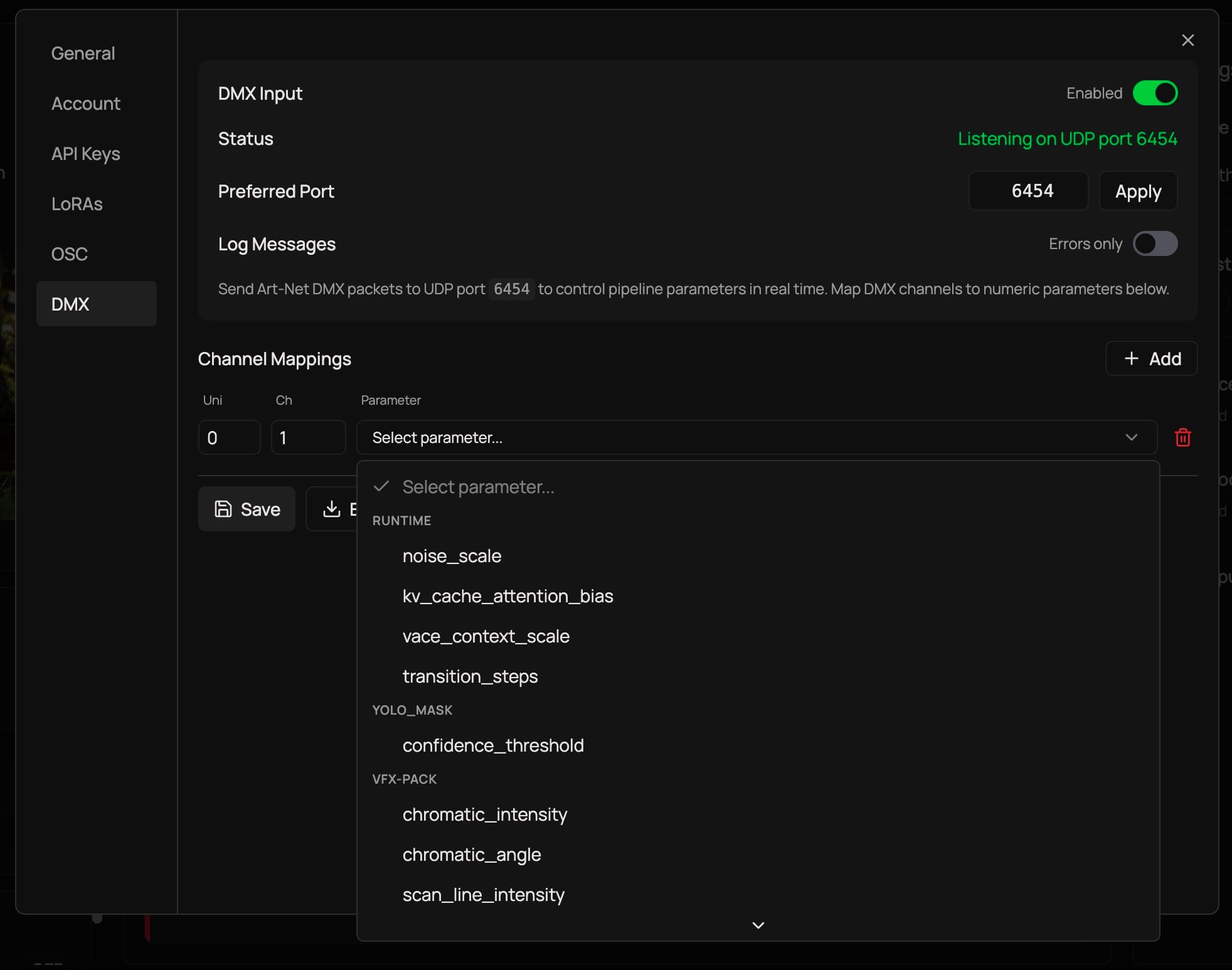
  content: `<p>And just like that, we&apos;ve reached Day 5 of&#xA0;<a href="https://daydream.live/launch-week-01?ref=blog.daydream.live">Launch Week</a>, the final one.</p><p>This week, we&apos;ve gone from local video sharing with&#xA0;<a href="https://blog.daydream.live/spout-and-syphon-in-scope-zero-latency-on-your-machine/">Spout and Syphon</a>, to network video with&#xA0;<a href="https://blog.daydream.live/ndi-in-scope-your-real-time-ai-video-across-the-network-and-beyond/">NDI</a>, to software control with&#xA0;<a href="https://blog.daydream.live/osc-scope-precision-real-time-ai-video-control-network/">OSC</a>, and all the way to physical control with&#xA0;<a href="https://blog.daydream.live/midi-in-scope-hands-on-real-time-ai-video-control/">MIDI</a>. </p><p>Today, we close the week where the digital meets the physical. DMX connects Scope to the stage.</p><p>DMX is the protocol that controls stage lighting. Every venue, every concert, every theater production, every festival with programmable lights runs on DMX. Lighting consoles from MA, ETC, Avolites, and others all speak it. And now your lighting desk can control Scope&apos;s AI video generation in real time, alongside the fixtures it&apos;s already running.</p><h2 id="what-dmx-brings-to-the-picture">What DMX brings to the picture</h2><p>If you&apos;re a lighting designer or a technical director, you already think in DMX channels. Faders on your console map to channels, channels map to fixture parameters, and the whole thing runs at show speed. Scope now fits into that same mental model.</p><p>Scope receives DMX data over Art-Net, which is the standard protocol for sending DMX over Ethernet. Your lighting console sends Art-Net packets over the network, and Scope listens for them on the standard Art-Net port (UDP 6454). You map DMX channels to Scope parameters, and the console controls AI video generation the same way it controls your lights.</p><p>The mapping works like this: each DMX channel sends a value from 0 to 255. Scope scales that value to the parameter&apos;s actual range automatically. So channel 1 sending 0-255 might map to noise scale 0.0-1.0, while channel 2 sending 0-255 maps to transition steps 0-100. The scaling is handled for you.</p><p>Updates run at approximately 60 Hz, which matches typical console refresh rates. Scope throttles incoming DMX to prevent flooding, and skips duplicate values so only actual changes get processed.</p><h2 id="what-this-means-in-practice">What this means in practice</h2><p><strong>For a lighting designer running a show</strong>, your console becomes a unified control surface for both lighting and AI video. Program a cue that dims the stage lights and simultaneously shifts Scope&apos;s generation toward darker, more atmospheric visuals. Build a chase that pulses the lights and the AI output together. The same faders that control your fixtures now control the AI.</p><p><strong>Live production teams</strong>&#xA0;working on concerts or events can integrate Scope into their existing show control workflow. The lighting console is already the central hub. Adding Scope as another &quot;fixture&quot; on the network means the LD can control AI visuals without learning new software or adding another control surface to the desk.</p><p><strong>Immersive installations</strong>&#xA0;where lighting and video need to feel like one unified environment get a direct connection between the two. Map your room lighting channels and your Scope generation channels on the same console, program them together, and the space responds as a whole.</p><p><strong>Venue operators and technical directors</strong>&#xA0;who need reliable, repeatable show control can program Scope parameters into their cue lists alongside traditional fixtures. DMX is the protocol they already trust for show-critical systems.</p><h2 id="what-you-can-control">What you can control</h2><p>Scope exposes its numeric parameters for DMX mapping. The parameters that are always available include:</p><ul><li><strong>Noise scale</strong>&#xA0;(0.0-1.0) - control generation intensity</li><li><strong>VACE context scale</strong>&#xA0;(0.0-2.0) - adjust guidance strength</li><li><strong>Transition steps</strong>&#xA0;(0-100) - how many steps to blend between prompts</li><li><strong>Cache attention bias</strong>&#xA0;(0.01-1.0) - how much the generation relies on previous frames</li></ul><p>Each loaded pipeline adds its own numeric parameters to the mappable set. You configure the mappings in Scope&apos;s settings panel, choosing which universe and channel controls which parameter.</p><h2 id="getting-started">Getting started</h2><ol><li>Open Scope and go to&#xA0;<strong>Settings</strong>&#xA0;&gt;&#xA0;<strong>DMX</strong>&#xA0;tab</li><li>Toggle&#xA0;<strong>DMX Input</strong>&#xA0;on</li><li>Confirm the port (default is 6454, the standard Art-Net port)</li><li>Under&#xA0;<strong>Channel Mappings</strong>, add your mappings: select a universe, channel number (1-512), and the parameter you want to control</li><li>Click&#xA0;<strong>Save</strong>&#xA0;to persist your configuration</li><li>Point your lighting console&apos;s Art-Net output at Scope&apos;s IP address and port</li></ol><figure class="kg-card kg-image-card kg-card-hascaption"><img src="https://storage.ghost.io/c/ee/84/ee847f83-2527-4049-945e-511415a6b18b/content/images/2026/04/dmx.jpg" class="kg-image" alt="DMX in Scope: From real-time AI video pixels to photons" loading="lazy" width="1964" height="1546" sizes="(min-width: 720px) 720px"><figcaption><span style="white-space: pre-wrap;">The DMX settings dialog in Scope</span></figcaption></figure><p>Scope will show &quot;Listening on UDP port 6454&quot; when it&apos;s ready. If port 6454 is taken by another application, Scope tries 6455, 6456, and 6457 as fallbacks.</p><p>You can toggle&#xA0;<strong>Log Messages</strong>&#xA0;to&#xA0;<strong>All</strong>&#xA0;to see every incoming DMX update in real time, which is useful for verifying your mappings are working correctly. The configuration persists between sessions, so you only need to set it up once per show.</p><p>You can also export and import your DMX configuration as JSON, making it easy to share setups between machines or back up your show configs.</p><h2 id="a-full-week-of-integrations">A full week of integrations</h2><p>And with this, we are wrapping up our Launch Week 01. </p><p>Here&apos;s what we covered:</p><p><strong>Monday</strong>&#xA0;-&#xA0;<a href="https://blog.daydream.live/spout-and-syphon-in-scope-zero-latency-on-your-machine/">Spout and Syphon</a>&#xA0;moved your video between apps on the same machine at GPU speed. The foundation.</p><p><strong>Tuesday</strong>&#xA0;-&#xA0;<a href="https://blog.daydream.live/ndi-in-scope-your-real-time-ai-video-across-the-network-and-beyond/">NDI</a>&#xA0;took your video across the network to any machine, any platform. With audio and metadata along for the ride.</p><p><strong>Wednesday</strong>&#xA0;-&#xA0;<a href="https://blog.daydream.live/osc-scope-precision-real-time-ai-video-control-network/">OSC</a>&#xA0;gave you float-precision parameter control over the network, from tablets, TouchDesigner, or custom scripts.</p><p><strong>Thursday</strong>&#xA0;-&#xA0;<a href="https://blog.daydream.live/midi-in-scope-hands-on-real-time-ai-video-control/">MIDI</a>&#xA0;put physical controllers in your hands. Knobs, faders, pads, all learn-mapped to generation parameters.</p><p><strong>Friday</strong>&#xA0;- And today, DMX connected Scope to the stage. Your lighting console now controls AI video alongside your fixtures.</p><p>Together, these five protocols make Scope a bridge between real-time AI video and the tools creative technologists, VJs, lighting designers, and installation artists already work in. Scope fits into your workflow rather than asking you to change it.</p><p>While these integrations are powerful and the team is building very rapidly, we understand that we are just getting started. </p><p>If you build something with these integrations, we&apos;d love to see it. Drop by the <a href="https://discord.com/invite/pF2Akym5bV?ref=blog.daydream.live" rel="noreferrer">Discord and share what you&apos;re working on</a>.</p><h2 id="links">Links</h2><ul><li><a href="https://daydream.live/launch-week-01?ref=blog.daydream.live">Launch Week 01</a>&#xA0;- The full week in one page</li><li><a href="https://blog.daydream.live/spout-and-syphon-in-scope-zero-latency-on-your-machine/">Day 1: Spout and Syphon</a></li><li><a href="https://blog.daydream.live/ndi-in-scope-your-real-time-ai-video-across-the-network-and-beyond/">Day 2: NDI</a></li><li><a href="https://blog.daydream.live/osc-scope-precision-real-time-ai-video-control-network/">Day 3: OSC</a></li><li><a href="https://blog.daydream.live/midi-in-scope-hands-on-real-time-ai-video-control/">Day 4: MIDI</a></li><li><a href="https://daydream.live/?ref=blog.daydream.live#hero">Download Scope</a>&#xA0;- Get the latest version</li><li><a href="https://github.com/daydreamlive/scope?ref=blog.daydream.live">GitHub</a>&#xA0;- Star the repo and check out the source</li><li><a href="https://discord.gg/pF2Akym5bV?ref=blog.daydream.live">Discord</a>&#xA0;- Join the community</li></ul>`,
  datePosted: `Apr 3, 2026`,
  img: `https://storage.ghost.io/c/ee/84/ee847f83-2527-4049-945e-511415a6b18b/content/images/2026/04/dmx-hero.jpg`,
  excerpt: `And just like that, we&apos;ve reached Day 5 of&#xA0;Launch Week, the final one.This week, we&apos;ve gone from local video sharing with&#xA0;Spout and Syphon, to network video with&#xA0;NDI, to software control with&#xA0;OSC, and all the way to physical control with&#xA0;MIDI. Today, we close the week where the digital meets the physical. DMX connects Scope to the stage.DMX is the protocol that controls stage lighting. Every venue, every concert, every theater production, every festival with pr`,
  readingTime: 4
}, {
  title: `MIDI in Scope: Hands-on real-time AI video control`,
  href: `https://blog.daydream.live/midi-in-scope-hands-on-real-time-ai-video-control/`,
  author: `By Daydream Team`,
  content: `<p>Time flies, and we are already on Day 4 of&#xA0;<a href="https://daydream.live/launch-week-01?ref=blog.daydream.live">Launch Week</a>. </p><p>On Monday we started with&#xA0;<a href="https://blog.daydream.live/spout-and-syphon-in-scope-zero-latency-on-your-machine/">Spout and Syphon</a>&#xA0;for local video sharing. Tuesday brought&#xA0;<a href="https://blog.daydream.live/ndi-in-scope-your-real-time-ai-video-across-the-network-and-beyond/">NDI</a>&#xA0;for network video. Yesterday,&#xA0;<a href="https://blog.daydream.live/osc-scope-precision-real-time-ai-video-control-network/">OSC</a>&#xA0;gave us precision parameter control over the network. Today, the control gets physical.</p><p><strong>MIDI</strong> is the protocol that connects hardware controllers to software. If you have a MIDI controller sitting on your desk, a drum pad, a keyboard, or a rack of faders, you can now map any of them directly to Scope&apos;s generation parameters. Turn a knob to adjust the noise scale. Tap a pad to switch prompts. Push a fader to blend between styles. The mapping is yours to define.</p><h2 id="midi-still-matters">MIDI still matters</h2><p>Yesterday, we talked about OSC and how it gives you high-resolution, network-native control. MIDI works differently. Instead of being about float precision or network routing. MIDI is about putting your hands on something physical and making adjustments.</p><p>MIDI has been the standard for hardware control in music and performance for decades. The ecosystem is massive. There are thousands of controllers, from simple knob boxes to complex performance surfaces, and they all speak the same language. When you pick up a MIDI controller, you already know how it works.</p><p>The resolution is lower than OSC (128 steps per parameter instead of continuous floats), but for live performance, that&apos;s often exactly enough. In most situations, you&apos;re not trying to dial in a value to four decimal places. Instead, you&apos;re reaching for a fader during a set and pushing it until the visual feels right.</p><h2 id="what-you-can-map">What you can map</h2><p>Scope uses the Web MIDI API with a learn-based mapping system. You don&apos;t need to manually configure CC numbers or channels. You click a parameter in Scope, move a knob on your controller, and the mapping is made. </p><p>Currently, four mapping types are available:</p><ul><li><strong>Continuous</strong>&#xA0;- faders and knobs controlling numeric parameters (noise scale, VACE strength, transition steps)</li><li><strong>Toggle</strong>&#xA0;- buttons that flip boolean parameters on and off (pause generation, enable noise controller)</li><li><strong>Trigger</strong>&#xA0;- one-shot actions like resetting the cache or switching prompts</li><li><strong>Enum cycle</strong>&#xA0;- rotate through a list of values with each press (interpolation methods, input modes)</li></ul><p>Beyond parameter control, you can also map MIDI to specific actions: switch between prompts, load presets, add or remove denoising steps, or toggle pause. These action triggers make MIDI especially useful during live performance when you need quick access to common operations without touching the screen.</p><p>Scope also supports MIDI clock for tempo sync. If your DAW or hardware is sending MIDI clock, Scope can derive BPM and beat phase from it, keeping visual transitions locked to the music. You can quantize parameter changes to beats or bars, and set lookahead for anticipating transitions.</p><h2 id="what-this-looks-like-in-practice">What this looks like in practice</h2><p><strong>A VJ with a MIDI controller</strong>&#xA0;is the most straightforward setup. Map your faders to noise scale, denoising strength, and VACE context. Map your pads to prompt switching. You now have a physical instrument for performing with AI video. Scope&apos;s mapping UI shows visual feedback (a colored dot on each mapped control), so you always know what&apos;s connected to what.</p><p><strong>DAW integration through Ableton or any MIDI-capable host</strong>&#xA0;opens up timeline-based control. Send MIDI CC automation from your DAW to Scope, and your visual transformations follow the music arrangement. Verse gets one look, chorus gets another, breakdown strips it back. The DAW becomes your visual sequencer.</p><p><strong>Multi-app setups</strong>&#xA0;are where you&apos;ll need virtual routing. MIDI typically locks a device to a single application, so if you want the same controller to talk to Scope and Resolume, you route it through a virtual MIDI bus. On macOS, the built-in IAC Driver handles this (enable it in Audio MIDI Setup). On Windows, loopMIDI by Tobias Erichsen does the same job. Set up your virtual ports, point your apps at them, and your controller fans out to everything.</p><p><strong>Gallery installations</strong>&#xA0;can use MIDI to give visitors physical interaction with AI video. A simple panel with a few knobs or buttons, mapped to Scope parameters, turns the generation into something people can touch. No screen interface needed.</p><h2 id="saving-and-switching-mappings">Saving and switching mappings</h2><p>Once you&apos;ve built a mapping that works for a show or project, Scope saves it as a profile. You can switch between profiles for different sets or venues without remapping everything from scratch. The mappings persist in your browser&apos;s local storage, so they survive restarts.</p><p>You can view all active mappings through the mappings modal (the list icon next to the MIDI toggle), which shows each controller input, its target parameter, mapping type, and range. Delete individual mappings or clear everything and start fresh.</p><h2 id="getting-started">Getting started</h2><ol><li>Connect your MIDI controller to your computer</li><li>In Scope, toggle&#xA0;<strong>MIDI Input</strong>&#xA0;on in the settings panel</li><li>Select your device from the&#xA0;<strong>Device</strong>&#xA0;dropdown</li><li>Click&#xA0;<strong>Edit Mapping</strong>&#xA0;to enter mapping mode</li><li>Click any parameter control in Scope (a slider, toggle, or button)</li><li>Move a knob or press a pad on your controller</li><li>The mapping is made - click&#xA0;<strong>Save Mapping</strong>&#xA0;when you&apos;re done</li></ol><p>If your controller isn&apos;t showing up, make sure no other application has exclusive access to it. On macOS, check that the IAC Driver is enabled if you need multi-app routing.</p><p>Full setup details, including virtual routing guides for macOS and Windows, in the&#xA0;<a href="https://docs.daydream.live/scope/guides/midi?ref=blog.daydream.live">MIDI docs</a>.</p><h2 id="whats-next">What&apos;s next</h2><p>Tomorrow, we close out Launch Week and showcase how digital meets physical. </p><p>If you&apos;ve ever wanted your real-time AI visuals and your venue&apos;s lighting to move as one, Friday is for you.</p><h2 id="links">Links</h2><ul><li><a href="https://daydream.live/launch-week-01?ref=blog.daydream.live">Launch Week 01</a>&#xA0;- Follow along all week</li><li><a href="https://blog.daydream.live/spout-and-syphon-in-scope-zero-latency-on-your-machine/">Day 1: Spout and Syphon</a>&#xA0;- Monday&apos;s post</li><li><a href="https://blog.daydream.live/ndi-in-scope-your-real-time-ai-video-across-the-network-and-beyond/">Day 2: NDI</a>&#xA0;- Tuesday&apos;s post</li><li><a href="https://blog.daydream.live/osc-scope-precision-real-time-ai-video-control-network/">Day 3: OSC</a>&#xA0;- Wednesday&apos;s post</li><li><a href="https://docs.daydream.live/scope/guides/midi?ref=blog.daydream.live">MIDI documentation</a>&#xA0;- Full setup guide with virtual routing walkthroughs</li><li><a href="https://daydream.live/?ref=blog.daydream.live#hero">Download Scope</a>&#xA0;- Get the latest version</li><li><a href="https://github.com/daydreamlive/scope?ref=blog.daydream.live">GitHub</a>&#xA0;- Star the repo and check out the source</li><li><a href="https://discord.gg/pF2Akym5bV?ref=blog.daydream.live">Discord</a>&#xA0;- Join the community</li></ul>`,
  datePosted: `Apr 2, 2026`,
  img: `https://storage.ghost.io/c/ee/84/ee847f83-2527-4049-945e-511415a6b18b/content/images/2026/04/midi-scope-hero.png`,
  excerpt: `Time flies, and we are already on Day 4 of&#xA0;Launch Week. On Monday we started with&#xA0;Spout and Syphon&#xA0;for local video sharing. Tuesday brought&#xA0;NDI&#xA0;for network video. Yesterday,&#xA0;OSC&#xA0;gave us precision parameter control over the network. Today, the control gets physical.MIDI is the protocol that connects hardware controllers to software. If you have a MIDI controller sitting on your desk, a drum pad, a keyboard, or a rack of faders, you can now map any of them direct`,
  readingTime: 5
}];

export const youtubeData = [{
  title: 'Scope workshop',
  href: 'https://www.youtube.com/watch?v=ggA2N4tInD0',
  author: 'By Daydream AI',
  content: '...',
  publishedDate: 'Mar 20, 2026',
  duration: 'PT49M32S',
  thumbnailUrl: 'https://i.ytimg.com/vi/ggA2N4tInD0/hqdefault.jpg'
}, {
  title: 'Encuentros de Tecnólogos Creativos de Madrid Daydream x MappingOn',
  href: 'https://www.youtube.com/watch?v=yZHcay_uodc',
  author: 'By Daydream AI',
  content: 'Visuales Generativos en Tiempo Real: TouchDesigner × StreamDiffusion × Daydream  En este workshop de 2 horas exploramos cómo crear visuales generativos en tiempo real combinando TouchDesigner, StreamDiffusion y Daydream. Recorrimos el flujo completo desde la entrada hasta la salida, procesando con IA generativa en vivo, desde configuración básica hasta un Live VJ Show con videomapping.   ¿Qué es Daydream? Daydream es una plataforma de video IA en tiempo real que genera y transforma contenido vis...',
  publishedDate: 'Mar 4, 2026',
  duration: 'PT2H56M16S',
  thumbnailUrl: 'https://i.ytimg.com/vi/yZHcay_uodc/hqdefault.jpg'
}, {
  title: 'Scope Workshop: AI Video Program Cohort 2 Finalist Showcase',
  href: 'https://www.youtube.com/watch?v=PyCTVICiueY',
  author: 'By Daydream AI',
  content: '...',
  publishedDate: 'Feb 27, 2026',
  duration: 'PT1H18S',
  thumbnailUrl: 'https://i.ytimg.com/vi/PyCTVICiueY/hqdefault.jpg'
}, {
  title: '2.0 Interactive AI Video Program - Demo Day',
  href: 'https://www.youtube.com/watch?v=Um1g1TB2d4A',
  author: 'By Daydream AI',
  content: '...',
  publishedDate: 'Feb 26, 2026',
  duration: 'PT34M43S',
  thumbnailUrl: 'https://i.ytimg.com/vi/Um1g1TB2d4A/hqdefault.jpg'
}, {
  title: 'Daydream Scope Workshop',
  href: 'https://www.youtube.com/watch?v=b771i2SFzjQ',
  author: 'By Daydream AI',
  content: '...',
  publishedDate: 'Feb 13, 2026',
  duration: 'PT1H2M18S',
  thumbnailUrl: 'https://i.ytimg.com/vi/b771i2SFzjQ/hqdefault.jpg'
}, {
  title: 'Vibe-code a Scope plugin with Claude Code',
  href: 'https://www.youtube.com/watch?v=pUqF010u-zQ',
  author: 'By Daydream AI',
  content: 'Learn how to build a complete real-time video effects plugin for Daydream Scope using AI-assisted development with Claude Code - no Python or PyTorch experience required.  We walk you through two different approaches: - Context7 MCP - an \"explore and build\" method where Claude pulls live documentation and figures out the plugin architecture on its own - Plugin Skill - an \"answer questions and ship\" method using a purpose-built skill with the full plugin reference baked in  By the end, you\'ll hav...',
  publishedDate: 'Feb 11, 2026',
  duration: 'PT21M57S',
  thumbnailUrl: 'https://i.ytimg.com/vi/pUqF010u-zQ/hqdefault.jpg'
}, {
  title: 'Scope Features Walkthrough',
  href: 'https://www.youtube.com/watch?v=Ls2OGg8soNU',
  author: 'By Daydream AI',
  content: 'This is a Scope features and a quick start video showcased in our docs....',
  publishedDate: 'Feb 11, 2026',
  duration: 'PT10M54S',
  thumbnailUrl: 'https://i.ytimg.com/vi/Ls2OGg8soNU/hqdefault.jpg'
}, {
  title: 'Building Plugins for Scope',
  href: 'https://www.youtube.com/watch?v=rZjRahfJHiY',
  author: 'By Daydream AI',
  content: 'This video shows you how to build a VFX plugin for Scope, step by step....',
  publishedDate: 'Feb 11, 2026',
  duration: 'PT13M50S',
  thumbnailUrl: 'https://i.ytimg.com/vi/rZjRahfJHiY/hqdefault.jpg'
}, {
  title: 'Realtime Creator Lounge #2',
  href: 'https://www.youtube.com/watch?v=2P0MDY-G5Qo',
  author: 'By Daydream AI',
  content: '...',
  publishedDate: 'Jan 28, 2026',
  duration: 'PT1H6M50S',
  thumbnailUrl: 'https://i.ytimg.com/vi/2P0MDY-G5Qo/hqdefault.jpg'
}, {
  title: 'How to connect TouchDesigner to Scope via NDI',
  href: 'https://www.youtube.com/watch?v=YmJSqcoWz-o',
  author: 'By Daydream AI',
  content: 'This video is to help TouchDesigner users to set up their first Scope project using TouchDesigner. After this video, any user will be able to use any TouchDesigner visual as an input for Scope via NDI.  Project File: https://app.daydream.live/creators/as.ws__/touchdesigner-scope-tutorial-first-connection?utm_source=youtube&utm_medium=social&utm_campaign=scope-touchdesigner NDI Tools: https://ndi.video/tools/ Depth Map Visual: https://civitai.com/models/972736/3d-motion-depth-map-18-24-30-fps Lon...',
  publishedDate: 'Jan 28, 2026',
  duration: 'PT13M35S',
  thumbnailUrl: 'https://i.ytimg.com/vi/YmJSqcoWz-o/hqdefault.jpg'
}, {
  title: 'TouchDesigner x Scope EP 03: Depth Maps and VACE',
  href: 'https://www.youtube.com/watch?v=v53458eIqeY',
  author: 'By Daydream AI',
  content: 'In this third episode of TouchDesigner × Scope, I use the Depth TOP in TouchDesigner to create a depth map to activate VACE to better control my output visual.  Project files and  assets can be found here:  https://app.daydream.live/creators/as.ws__/touchdesigner-x-scope-ep-03-depth-maps-and-vace?utm_source=youtube&utm_medium=social&utm_campaign=scope-touchdesigner  More episodes coming soon as we dive deeper into Scope\'s video models, prompting workflows, and real time creative control.  1:03 -...',
  publishedDate: 'Jan 28, 2026',
  duration: 'PT7M51S',
  thumbnailUrl: 'https://i.ytimg.com/vi/v53458eIqeY/hqdefault.jpg'
}, {
  title: 'TouchDesigner ×  Scope EP 02: Krea Model and Denoising',
  href: 'https://www.youtube.com/watch?v=NVumbOMf-os',
  author: 'By Daydream AI',
  content: 'In this second episode of TouchDesigner × Scope, I use the same visual input as the previous video to understand model differences and make sense of denoising parameters.  Project files and timeline assets can be found here:  https://app.daydream.live/creators/as.ws__/touchdesigner-x-scope-first-connection?utm_source=youtube&utm_medium=social&utm_campaign=scope-touchdesigner  More episodes coming soon as we dive deeper into Scope\'s video models, prompting workflows, and real time creative contro...',
  publishedDate: 'Jan 24, 2026',
  duration: 'PT6M46S',
  thumbnailUrl: 'https://i.ytimg.com/vi/NVumbOMf-os/hqdefault.jpg'
}, {
  title: 'TouchDesigner ×  Scope EP 01: First Output',
  href: 'https://www.youtube.com/watch?v=K_tX255qSkw',
  author: 'By Daydream AI',
  content: 'In this first episode of TouchDesigner × Scope, I explore using TouchDesigner as a live input source for Scope running the LongLive Model.   Project files and timeline assets can be found here:  https://app.daydream.live/creators/as.ws__/touchdesigner-x-scope-first-connection?utm_source=youtube&utm_medium=social&utm_campaign=scope-touchdesigner  More episodes coming soon as we dive deeper into Scope\'s video models, prompting workflows, and real time creative control.  0:00 - Introduction & Overv...',
  publishedDate: 'Jan 24, 2026',
  duration: 'PT8M29S',
  thumbnailUrl: 'https://i.ytimg.com/vi/K_tX255qSkw/hqdefault.jpg'
}, {
  title: 'Building with Scope in Public #5: Scope Plugins + Overworld\'s World Model',
  href: 'https://www.youtube.com/watch?v=cW3ZGxZNX0g',
  author: 'By Daydream AI',
  content: 'Scope now supports plugins - and we\'re using it to explore AI-generated worlds you can actually walk around in.  In this episode, I walk you through installing the scope-overworld plugin, which brings Overworld\'s Waypoint-1 world model into Scope. Unlike regular real-time video generation, world models let you navigate 3D environments using WASD and mouse controls. It\'s like stepping inside an AI-generated video game.  We go from zero to walking on Mars, a cozy Christmas scene, and more - all ru...',
  publishedDate: 'Jan 23, 2026',
  duration: 'PT11M10S',
  thumbnailUrl: 'https://i.ytimg.com/vi/cW3ZGxZNX0g/hqdefault.jpg'
}, {
  title: 'Scope Workshop - Plugins Preview',
  href: 'https://www.youtube.com/watch?v=BYFbb6erRfw',
  author: 'By Daydream AI',
  content: 'Scope Workshop - Plugins Preview  Scope is getting a plugins feature - opening the door for extensibility and new capabilities beyond our core pipelines. We will:  1) Demo the OverWorld plugin, which brings a world model to Scope with interactive controls and real-time exploration.  2) Show you how it works, talk through the plugins architecture, and share how you can get started building your own.  3) Touch on controllability, what you can build around this, and where we\'re headed.   If you\'ve ...',
  publishedDate: 'Jan 23, 2026',
  duration: 'PT1H7M19S',
  thumbnailUrl: 'https://i.ytimg.com/vi/BYFbb6erRfw/hqdefault.jpg'
}, {
  title: 'Daydream Interactive AI Video Program  Demo Day',
  href: 'https://www.youtube.com/watch?v=pC-S9ALjB38',
  author: 'By Daydream AI',
  content: 'Join us for the Interactive AI Video Program Demo Day, where we\'ll showcase projects built during Daydream\'s Interactive AI Video Program.  ​Participants worked across two tracks: Daydream Scope Track and TouchDesigner / StreamDiffusionTD Track where they explored real-time, interactive AI video workflows. From these tracks, the top 3 projects will be selected and their creators will present their work live during Demo Day.  ​The event features: Live demos from the top three projects across both...',
  publishedDate: 'Jan 17, 2026',
  duration: 'PT43M30S',
  thumbnailUrl: 'https://i.ytimg.com/vi/pC-S9ALjB38/hqdefault.jpg'
}, {
  title: 'Scope Workshop ft. the Scope Track Winners',
  href: 'https://www.youtube.com/watch?v=NhQSLMC6hvk',
  author: 'By Daydream AI',
  content: 'This week\'s Scope Workshop ft. the Scope Track winners  We\'re running a special Scope Workshop with the top three projects from the Scope Track of the Interactive AI Video Program.  You\'ll get to see how these creators pushed Scope to build real-time, interactive AI experiences, and hear directly from them about their workflows, challenges, and breakthroughs.  Featuring: 🥇 Lars Hurrelbrink: Scope V2V Integration for Unity A live system that streams game footage, depth, and character data into S...',
  publishedDate: 'Jan 16, 2026',
  duration: 'PT1H5M17S',
  thumbnailUrl: 'https://i.ytimg.com/vi/NhQSLMC6hvk/hqdefault.jpg'
}, {
  title: 'Realtime Creator Longe',
  href: 'https://www.youtube.com/watch?v=i1D7nVCtjsU',
  author: 'By Daydream AI',
  content: 'Join us today in the Daydream Discord with the StreamDiffusionTD Track finalists from the AI Video Program.  Demo 1: Juan Franco Phone-controlled generative L-systems built with TouchDesigner + StreamDiffusion. Link: https://app.daydream.live/s/sh/creators/juanelfranco/becoming  Demo 2: Emil Petro Feedback-driven AI architecture where Brutalist structures evolve into living systems. Link: https://app.daydream.live/s/sh/creators/emilpetro/concrete  Learn more about Daydream:   X: @daydreamLiveAI ...',
  publishedDate: 'Jan 15, 2026',
  duration: 'PT1H12M22S',
  thumbnailUrl: 'https://i.ytimg.com/vi/i1D7nVCtjsU/hqdefault.jpg'
}, {
  title: 'Daydream Interactive AI Video Program: Demo Day',
  href: 'https://www.youtube.com/watch?v=0mjO9gBXCKI',
  author: 'By Daydream AI',
  content: 'Join us for the Interactive AI Video Program Demo Day, where we\'ll showcase projects built during Daydream\'s Interactive AI Video Program.  ​Participants worked across two tracks: Daydream Scope Track and TouchDesigner / StreamDiffusionTD Track where they explored real-time, interactive AI video workflows. From these tracks, the top 3 projects will be selected and their creators will present their work live during Demo Day.  ​The event will feature: - Live demos from the top three projects acros...',
  publishedDate: 'Jan 14, 2026',
  duration: 'PT45M32S',
  thumbnailUrl: 'https://i.ytimg.com/vi/0mjO9gBXCKI/hqdefault.jpg'
}, {
  title: 'Scope Workshop - Jan 7, 2026',
  href: 'https://www.youtube.com/watch?v=r_WrZAGco2o',
  author: 'By Daydream AI',
  content: 'Join us for this week\'s Scope workshop, where the Daydream team will showcase recent updates and expanded functionality we\'ve added to Scope.  What we\'ll cover: - New Scope improvements and expanded capabilities, including VACE integration for things like reference image support and more, - Demos and insights from our team members, - What\'s ahead on our roadmap,  As always, do come with your questions! We\'ll walk through what we\'ve built, show it in action, and discuss where Scope is heading nex...',
  publishedDate: 'Jan 10, 2026',
  duration: 'PT1H4M3S',
  thumbnailUrl: 'https://i.ytimg.com/vi/r_WrZAGco2o/hqdefault.jpg'
}, {
  title: 'Learning with Scope in Public #4: Scope Desktop App and Community Hub',
  href: 'https://www.youtube.com/watch?v=M0vtuNSGphc',
  author: 'By Daydream AI',
  content: 'In this episode of Building in Public with Scope, I\'m sharing why Scope suddenly feels different - and it\'s not just one feature.  Scope now has an early Windows desktop app, which means that if you have a powerful enough GPU (think RTX 4090 / 5090), you can run Scope locally, in real time, without touching the CLI or spinning up external infrastructure.  This fundamentally changes the experimentation loop.  In this video, I:  - Walk through what changes when Scope runs as a desktop app - Use th...',
  publishedDate: 'Dec 20, 2025',
  duration: 'PT8M59S',
  thumbnailUrl: 'https://i.ytimg.com/vi/M0vtuNSGphc/hqdefault.jpg'
}, {
  title: 'Scope Workshop: Building Interactive Games with Scope',
  href: 'https://www.youtube.com/watch?v=D-iUKOhPpPo',
  author: 'By Daydream AI',
  content: 'This Scope Workshop covers the latest updates to Scope, including new LoRA support, upcoming improvements, creative user scenarios, and how Scope integrates with tools like Unity and Unreal. We also introduce the Scope Hacker Program and answer questions from the community.  In this session, guest speaker Cristian (https://www.ilumineworks.com/) demonstrates how he built a playable Choose Your Own Adventure style game using Scope and Unity. He walks through the full workflow, explains how large ...',
  publishedDate: 'Dec 19, 2025',
  duration: 'PT1H3M39S',
  thumbnailUrl: 'https://i.ytimg.com/vi/D-iUKOhPpPo/hqdefault.jpg'
}, {
  title: 'MotionStream Workshop with Joonghuk',
  href: 'https://www.youtube.com/watch?v=03cZLjW_iiA',
  author: 'By Daydream AI',
  content: '​Joonghyuk Shin is one of the creators of MotionStream, the world\'s first real time video AI model controllable by motion, enabling real-time image to video that\'s highly controllable.  ​In this workshop, Joonghyuk will walk us through the technical design behind this pipeline, demonstrate diverse practical downstream applications, and discuss future directions for interactive content creation.  ​🌟 About Daydream: Daydream is a community hub for real time video world models. You can explore cre...',
  publishedDate: 'Dec 8, 2025',
  duration: 'PT1H4M20S',
  thumbnailUrl: 'https://i.ytimg.com/vi/03cZLjW_iiA/hqdefault.jpg'
}, {
  title: 'Learning with Scope in Public #3: Transform Any Video with LoRA Adapters',
  href: 'https://www.youtube.com/watch?v=qeHNE5BMQPE',
  author: 'By Daydream AI',
  content: 'What if you could turn a photorealistic video into a Pixar-style cartoon with one small file?  In this episode, we explore LoRA adapters in Scope - small add-on files that teach the AI new visual styles without retraining or changing the entire model.  I\'ll show you how to download a LoRA, where to find good ones, and the one thing you absolutely need to remember: the trigger keyword. Without it, your LoRA won\'t do anything.  We\'ll run the same prompt twice - once photorealistic, once Pixar styl...',
  publishedDate: 'Dec 6, 2025',
  duration: 'PT7M37S',
  thumbnailUrl: 'https://i.ytimg.com/vi/qeHNE5BMQPE/hqdefault.jpg'
}, {
  title: 'MotionStream Workshop w/ Joonghuk',
  href: 'https://www.youtube.com/watch?v=57JtK5QgGLU',
  author: 'By Daydream AI',
  content: '...',
  publishedDate: 'Dec 5, 2025',
  duration: 'PT1H11M27S',
  thumbnailUrl: 'https://i.ytimg.com/vi/57JtK5QgGLU/hqdefault.jpg'
}, {
  title: 'Learning with Scope in Public #2: Can AI Upscalers Fix Low-Res Video?',
  href: 'https://www.youtube.com/watch?v=VRY8CP3AzyI',
  author: 'By Daydream AI',
  content: 'Low resolution = smooth real-time generation. But can you fix it in post-production? In this episode, we put AI upscalers to the test: Video2X (free & open source) vs Topaz Video AI (commercial). We generate a cozy Thanksgiving scene in Scope using Krea Realtime, then run it through both upscalers and compare the results side-by-side.  🚀 TRY SCOPE YOURSELF (free & open source): https://github.com/daydreamlive/scope  Key Findings: - AI upscalers genuinely work - visible quality improvement - The...',
  publishedDate: 'Nov 29, 2025',
  duration: 'PT9M43S',
  thumbnailUrl: 'https://i.ytimg.com/vi/VRY8CP3AzyI/hqdefault.jpg'
}, {
  title: 'Building with Scope in Public #1: What Kills FPS in Real-Time AI Video?',
  href: 'https://www.youtube.com/watch?v=ZRI6p1iLikM',
  author: 'By Daydream AI',
  content: 'What happens when you push real-time AI video generation to its limits? In this first episode, we test how resolution and denoising steps affect video quality and frame rate across three models: StreamDiffusion V2, LongLive, and Krea Realtime.  Key Findings:  - Doubling resolution = 85% FPS drop on LongLive - Fewer denoising steps = higher FPS but lower quality - Each model has different performance sweet spots  Try Scope yourself and join our community: ⭐ GitHub: https://github.com/daydreamlive...',
  publishedDate: 'Nov 22, 2025',
  duration: 'PT16M4S',
  thumbnailUrl: 'https://i.ytimg.com/vi/ZRI6p1iLikM/hqdefault.jpg'
}, {
  title: 'LoRAs + Real-Time Video Models: Scope v0.1.0a7 Walkthrough',
  href: 'https://www.youtube.com/watch?v=OygciNFzrVo',
  author: 'By Daydream AI',
  content: 'A walkthrough of using LoRAs in Scope v0.1.0a7.  Release: https://github.com/daydreamlive/scope/releases/tag/v0.1.0a7  Additional resources:  - Demo: https://x.com/YondonFu/status/1991948288736596415 - Install instructions: https://github.com/daydreamlive/scope?tab=readme-ov-file#install - First generation guide: https://github.com/daydreamlive/scope?tab=readme-ov-file#first-generation - LoRA guide: https://github.com/daydreamlive/scope/blob/main/docs/lora.md...',
  publishedDate: 'Nov 22, 2025',
  duration: 'PT5M4S',
  thumbnailUrl: 'https://i.ytimg.com/vi/OygciNFzrVo/hqdefault.jpg'
}, {
  title: 'StreamDiffusion in TouchDesigner Workshop',
  href: 'https://www.youtube.com/watch?v=iLjksLHr2NI',
  author: 'By Daydream AI',
  content: 'Learn how to use Daydream\'s remote Stream Diffusion service to run advanced AI workflows without needing a \$3,000+ RTX 4090/5090 GPU workstation.  Below you will find all relevant links:  https://www.patreon.com/posts/streamdiffusiont-142969263 https://app.daydream.live/creators/daydream https://app.daydream.live/dashboard/api-keys  Learn more about Daydream:   X: @daydreamLiveAI  Website:  https://daydream.live/  Discord: https://discord.com/invite/daydreamlive...',
  publishedDate: 'Nov 13, 2025',
  duration: 'PT48M45S',
  thumbnailUrl: 'https://i.ytimg.com/vi/iLjksLHr2NI/hqdefault.jpg'
}, {
  title: 'Workshop: SDXL IP ADAPTERS STREAMDIFFUSIONTD',
  href: 'https://www.youtube.com/watch?v=5Lbx3lm0yMY',
  author: 'By Daydream AI',
  content: 'Catch the walkthrough of Dotsimulate\'s & Andrew\'s latest update to StreamDiffusionTD, now featuring native SDXL support. The session will show how to get started with the new component, connect to local or hosted inference, and explore real-time image and video generation.  ​For those without high-end GPUs, the update integrates Daydream\'s server-hosted SDXL service, making it easy to experiment and build directly from the cloud. We\'ll look at how to prompt with reference images, tune parameters...',
  publishedDate: 'Nov 8, 2025',
  duration: 'PT1H7M26S',
  thumbnailUrl: 'https://i.ytimg.com/vi/5Lbx3lm0yMY/hqdefault.jpg'
}, {
  title: 'SDXL IP ADAPTERS STREAMDIFFUSIONTD Release',
  href: 'https://www.youtube.com/watch?v=ZLKunWNZymY',
  author: 'By Daydream AI',
  content: 'Join us for a walkthrough of Dotsimulate\'s latest update to StreamDiffusionTD, now featuring native SDXL support. The session will show how to get started with the new component, connect to local or hosted inference, and explore real-time image and video generation.  ​For those without high-end GPUs, the update integrates Daydream\'s server-hosted SDXL service, making it easy to experiment and build directly from the cloud. We\'ll look at how to prompt with reference images, tune parameters for co...',
  publishedDate: 'Nov 7, 2025',
  duration: 'PT1H7M25S',
  thumbnailUrl: 'https://i.ytimg.com/vi/ZLKunWNZymY/hqdefault.jpg'
}, {
  title: 'How to Run Daydream Scope in the Cloud with RunPod | Complete Setup Guide',
  href: 'https://www.youtube.com/watch?v=XBFtgSQg7X4',
  author: 'By Daydream AI',
  content: 'Learn how to get started with Daydream Scope using RunPod cloud - perfect if you don\'t have a powerful GPU locally. This step-by-step tutorial covers everything from initial setup to running your first real-time AI video generation pipeline.  What you\'ll learn: Setting up Daydream Scope on RunPod.io Selecting the right GPU for your pipelines Configuring HuggingFace tokens for cloud environments Running Stream Diffusion and other pipelines Managing your cloud resources efficiently  Important link...',
  publishedDate: 'Oct 31, 2025',
  duration: 'PT4M26S',
  thumbnailUrl: 'https://i.ytimg.com/vi/XBFtgSQg7X4/hqdefault.jpg'
}, {
  title: 'Krea x Daydream Scope - Real-Time Video Model Integration',
  href: 'https://www.youtube.com/watch?v=uEvM638QWZI',
  author: 'By Daydream AI',
  content: 'The latest Daydream Scope release introduces support for the Krea AI real-time video model, enabling interactive text-to-video generation with smooth, dynamic prompt transitions.  In this video, Yondon Fu walks through the new integration, showing how the model runs live inside Scope, including real-time prompt changes and performance benchmarks: ~6 FPS at 480×832 on NVIDIA H100 ~11 FPS at 320×576 on RTX 5090 with FP8 quantization (Linux only; Windows support in progress)  Full release notes: ht...',
  publishedDate: 'Oct 31, 2025',
  duration: 'PT3M37S',
  thumbnailUrl: 'https://i.ytimg.com/vi/uEvM638QWZI/hqdefault.jpg'
}, {
  title: 'Ian Messina - Realtime Video AI Summit 2025 by Daydream',
  href: 'https://www.youtube.com/watch?v=o9sBtdnFJ28',
  author: 'By Daydream AI',
  content: 'Ian Messina presented on \"Real Time Video AI in Virtual Production\" at the Real-Time Video AI Summit, hosted by Daydream, where leading researchers and creators explored the future of real-time video generation and creative AI.  Learn more about Daydream:   X: @daydreamLiveAI  Website:  https://daydream.live/  Discord: https://discord.com/invite/daydreamlive...',
  publishedDate: 'Oct 31, 2025',
  duration: 'PT16M59S',
  thumbnailUrl: 'https://i.ytimg.com/vi/o9sBtdnFJ28/hqdefault.jpg'
}, {
  title: 'James Barnes - Realtime Video AI Summit 2025 by Daydream',
  href: 'https://www.youtube.com/watch?v=FcRGtcb5RRQ',
  author: 'By Daydream AI',
  content: 'James Barnes presented on \"If You Can Dream It, You Can Do It\" at the Real-Time Video AI Summit, hosted by Daydream, where leading researchers and creators explored the future of real-time video generation and creative AI.  Learn more about Daydream:   X: @daydreamLiveAI  Website:  https://daydream.live/  Discord:   https://discord.com/invite/daydreamlive...',
  publishedDate: 'Oct 31, 2025',
  duration: 'PT22M39S',
  thumbnailUrl: 'https://i.ytimg.com/vi/FcRGtcb5RRQ/hqdefault.jpg'
}, {
  title: 'Eddy Vajarakitipongse - Realtime Video AI Summit 2025 by Daydream',
  href: 'https://www.youtube.com/watch?v=oQex89C7naE',
  author: 'By Daydream AI',
  content: 'Eddy Vajarakitipongse presented on \"Real-Time AI for Interactive Art Installations on Only 6GB VRAM\" at the Real-Time Video AI Summit, hosted by Daydream, where leading researchers and creators explored the future of real-time video generation and creative AI.  Learn more about Daydream:   X: @daydreamLiveAI  Website:  https://daydream.live/  Discord: https://discord.com/invite/daydreamlive...',
  publishedDate: 'Oct 31, 2025',
  duration: 'PT12M53S',
  thumbnailUrl: 'https://i.ytimg.com/vi/oQex89C7naE/hqdefault.jpg'
}];

export const BorderedBox = ({children, variant = "default", padding = "var(--lp-spacing-4)", borderRadius = "var(--lp-spacing-px-8)", accentBar = "", style = {}, className = "", ...rest}) => {
  const variants = {
    default: {
      border: "1px solid var(--lp-color-border-default)",
      backgroundColor: "var(--lp-color-bg-card)"
    },
    accent: {
      border: "1px solid var(--lp-color-accent)",
      backgroundColor: "var(--lp-color-bg-card)"
    },
    muted: {
      border: "1px solid var(--lp-color-border-default)",
      backgroundColor: "transparent"
    }
  };
  const accentBarColors = {
    accent: "var(--lp-color-accent)",
    positive: "var(--green-9)"
  };
  return <div data-docs-bordered-box="" data-accent-bar={accentBarColors[accentBar] ? "" : undefined} className={className} style={{
    ...variants[variant],
    padding: padding,
    borderRadius: borderRadius,
    ...accentBarColors[accentBar] ? {
      position: "relative",
      '--accent-bar-color': accentBarColors[accentBar]
    } : {},
    ...style
  }} {...rest}>
      {children}
    </div>;
};

export const CenteredContainer = ({children, maxWidth = "800px", padding = "0", preset = "default", width = "", minWidth = "", marginRight = "", marginBottom = "", textAlign = "", style = {}, className = "", ...rest}) => {
  const presets = {
    default: {},
    fitContent: {
      width: "fit-content",
      minWidth: "fit-content"
    },
    readable70: {
      width: "70%",
      minWidth: "fit-content"
    },
    readable80: {
      width: "80%",
      minWidth: "fit-content"
    },
    readable90: {
      width: "90%"
    },
    wide900: {
      maxWidth: "900px"
    }
  };
  const presetStyle = presets[preset] || presets.default;
  return <div className={className} style={{
    maxWidth: presetStyle.maxWidth || maxWidth,
    margin: "0 auto",
    padding: padding,
    ...presetStyle.width ? {
      width: presetStyle.width
    } : {},
    ...presetStyle.minWidth ? {
      minWidth: presetStyle.minWidth
    } : {},
    ...width ? {
      width
    } : {},
    ...minWidth ? {
      minWidth
    } : {},
    ...marginRight ? {
      marginRight
    } : {},
    ...marginBottom ? {
      marginBottom
    } : {},
    ...textAlign ? {
      textAlign
    } : {},
    ...style
  }} {...rest}>
      {children}
    </div>;
};

export const LazyLoad = ({children, height = "200px", offset = "200px", fadeDuration = 400, className = "", style = {}, ...rest}) => {
  const ref = useRef(null);
  const [visible, setVisible] = useState(false);
  const [ready, setReady] = useState(false);
  useEffect(() => {
    const el = ref.current;
    if (!el) return;
    const observer = new IntersectionObserver(([entry]) => {
      if (entry.isIntersecting) {
        setVisible(true);
        observer.disconnect();
      }
    }, {
      rootMargin: offset
    });
    observer.observe(el);
    return () => observer.disconnect();
  }, []);
  useEffect(() => {
    if (!visible) return;
    const frameId = requestAnimationFrame(() => {
      setReady(true);
    });
    return () => cancelAnimationFrame(frameId);
  }, [visible]);
  const placeholder = <div ref={ref} className={className} style={{
    minHeight: height,
    ...style
  }} {...rest} />;
  if (!visible) return placeholder;
  return <div ref={ref} className={className} style={{
    opacity: ready ? 1 : 0,
    transition: `opacity ${fadeDuration}ms ease-in`,
    ...style
  }} {...rest}>
      {children}
    </div>;
};

export const ScrollBox = ({children, maxHeight = 300, showHint = true, ariaLabel = "Scrollable content", style = {}, className = "", ...rest}) => {
  const contentRef = useRef(null);
  const [isOverflowing, setIsOverflowing] = useState(false);
  useEffect(() => {
    const checkOverflow = () => {
      if (contentRef.current) {
        const maxHeightPx = typeof maxHeight === "number" ? maxHeight : parseInt(maxHeight, 10) || 300;
        setIsOverflowing(contentRef.current.scrollHeight > maxHeightPx);
      }
    };
    checkOverflow();
    window.addEventListener("resize", checkOverflow);
    return () => window.removeEventListener("resize", checkOverflow);
  }, [maxHeight, children]);
  return <div className={className} style={{
    position: "relative",
    ...style
  }} {...rest}>
      <div ref={contentRef} role="region" tabIndex={0} aria-label={ariaLabel} style={{
    maxHeight: typeof maxHeight === "number" ? `${maxHeight}px` : maxHeight,
    overflowY: "auto",
    paddingRight: 4
  }} onScroll={e => {
    const el = e.target;
    const atBottom = el.scrollHeight - el.scrollTop <= el.clientHeight + 10;
    const hint = el.parentNode.querySelector("[data-scroll-hint]");
    if (hint) hint.style.opacity = atBottom ? "0" : "1";
  }}>
        {children}
      </div>
      {showHint && isOverflowing && <div data-scroll-hint style={{
    fontSize: 11,
    color: "var(--lp-color-text-muted)",
    textAlign: "center",
    marginTop: 8,
    transition: "opacity 0.2s"
  }}>
          Scroll for more ↓
        </div>}
    </div>;
};

export const CustomDivider = ({color = "var(--lp-color-border-default)", middleText = "", spacing = "default", style = {}, className = "", ...rest}) => {
  const spacingPresets = {
    default: {
      margin: "24px 0"
    },
    overlap: {
      margin: "-1rem 0 -1rem 0"
    },
    tight: {
      margin: "0 0 -1rem 0"
    },
    section: {
      margin: "0 0 -2rem 0"
    },
    sectionOverlap: {
      margin: "-1rem 0 -2rem 0"
    },
    deepOverlap: {
      margin: "-1rem 0 -1.5rem 0"
    }
  };
  const spacingStyle = spacingPresets[spacing] || spacingPresets.default;
  return <div role="separator" aria-orientation="horizontal" className={className} style={{
    display: "flex",
    alignItems: "center",
    ...spacingStyle,
    fontSize: style?.fontSize || "16px",
    height: "fit-content",
    ...style
  }} {...rest}>
      <span style={{
    marginRight: "var(--lp-spacing-px-8)",
    opacity: 0.2
  }}>
        <Icon icon="/snippets/assets/logos/Livepeer-Logo-Symbol-Theme.svg" />
      </span>
      <div style={{
    flex: 1,
    height: "1px",
    background: "var(--lp-color-border-default)",
    opacity: 0.4
  }}></div>
      {middleText && <>
          <Icon icon="circle" size={2} />
          <span style={{
    margin: "0 8px",
    fontWeight: "bold",
    color: color,
    opacity: 0.7
  }}>
            {middleText}
          </span>
          <Icon icon="circle" size={2} />
        </>}
      <div style={{
    flex: 1,
    height: "1px",
    background: "var(--lp-color-border-default)",
    opacity: 0.4
  }}></div>
      <span style={{
    marginLeft: "var(--lp-spacing-px-8)",
    opacity: 0.2
  }}>
        <span style={{
    display: "inline-block",
    transform: "scaleX(-1)"
  }}>
          <Icon icon="/snippets/assets/logos/Livepeer-Logo-Symbol-Theme.svg" />
        </span>
      </span>
    </div>;
};

export const MarkdownEmbed = ({url, className = '', style = {}, ...rest}) => {
  const [html, setHtml] = useState('');
  useEffect(() => {
    fetch(url).then(res => res.text()).then(md => {
      const converted = md.replace(/```(\w*)\n([\s\S]*?)```/g, '<pre><code>$2</code></pre>').replace(/`([^`]+)`/g, '<code>$1</code>').replace(/!\[([^\]]*)\]\(([^)]+)\)/g, '<img alt="$1" src="$2" style="max-width:100%" />').replace(/\[([^\]]+)\]\(([^)]+)\)/g, '<a href="$2" target="_blank" rel="noopener noreferrer">$1</a>').replace(/^######\s+(.+?)(?:\s+#+)?$/gm, '<h6>$1</h6>').replace(/^#####\s+(.+?)(?:\s+#+)?$/gm, '<h5>$1</h5>').replace(/^####\s+(.+?)(?:\s+#+)?$/gm, '<h4>$1</h4>').replace(/^###\s+(.+?)(?:\s+#+)?$/gm, '<h3>$1</h3>').replace(/^##\s+(.+?)(?:\s+#+)?$/gm, '<h2>$1</h2>').replace(/^#\s+(.+?)(?:\s+#+)?$/gm, '<h1>$1</h1>').replace(/\*\*\*(.+?)\*\*\*/g, '<strong><em>$1</em></strong>').replace(/\*\*(.+?)\*\*/g, '<strong>$1</strong>').replace(/\*(.+?)\*/g, '<em>$1</em>').replace(/^---$/gm, '<hr />').replace(/^[-*]\s+(.+)$/gm, '<li>$1</li>').replace(/\n\n/g, '</p><p>').replace(/\n/g, '<br />');
      setHtml('<p>' + converted + '</p>');
    });
  }, [url]);
  if (!html) return <div className={className} style={style} {...rest}>
        <p style={{
    color: 'var(--text-secondary)'
  }}>Loading...</p>
      </div>;
  return <div className={className} {...rest} style={{
    maxWidth: '100%',
    overflowWrap: 'anywhere',
    wordBreak: 'break-word',
    ...style
  }} dangerouslySetInnerHTML={{
    __html: html
  }} />;
};

export const DiscordAnnouncements = ({serverName = 'Livepeer', items = [], limit, ScrollBox, scrollMaxHeight = 300, className = '', style = {}, ...rest}) => {
  const sanitiseHTML = html => {
    if (!html || typeof html !== 'string') return '';
    return html.replace(/<script[\s\S]*?<\/script>/gi, '').replace(/<iframe[\s\S]*?<\/iframe>/gi, '').replace(/<object[\s\S]*?<\/object>/gi, '').replace(/<embed[\s\S]*?>/gi, '').replace(/<form[\s\S]*?<\/form>/gi, '').replace(/<style[\s\S]*?<\/style>/gi, '').replace(/<link[\s\S]*?>/gi, '').replace(/\bon\w+\s*=\s*(['"])[^'"]*\1/gi, '').replace(/\bon\w+\s*=\s*[^\s>]*/gi, '').replace(/javascript\s*:/gi, '');
  };
  const displayItems = limit ? items.slice(0, limit) : items;
  if (!displayItems || displayItems.length === 0) {
    return <Note>
        <p style={{
      color: 'var(--text-secondary)',
      textAlign: 'center'
    }}>
          No announcements at this time.
        </p>
      </Note>;
  }
  const parseContent = content => {
    const withLinks = content.replace(/\[([^\]]+)\]\(([^)]+)\)/g, '<a href="$2" target="_blank" rel="noopener noreferrer">$1 ↗</a>');
    return withLinks;
  };
  return <div className={className} style={{
    display: 'flex',
    flexDirection: 'column',
    gap: "var(--lp-spacing-4)",
    border: '1px solid var(--lp-color-accent)',
    borderRadius: "var(--lp-spacing-2)",
    padding: "var(--lp-spacing-4)",
    ...style
  }} {...rest}>
      {displayItems.map((announcement, index) => <div key={announcement.id} href={announcement.url} target="_blank" rel="noopener noreferrer">
          <div style={{
    display: 'flex',
    alignItems: 'center',
    gap: "var(--lp-spacing-2)",
    fontSize: '0.875rem',
    marginBottom: "var(--lp-spacing-3)",
    width: '100%'
  }}>
            <Icon icon="discord" color="var(--lp-color-brand-discord)" size={16} />
            <span style={{
    fontWeight: 600,
    color: 'var(--lp-color-accent)',
    fontSize: 'medium'
  }}>
              {serverName}
              {}
            </span>
            <span style={{
    color: 'var(--lp-color-text-secondary)'
  }}>•</span>
            <time dateTime={announcement.timestamp} style={{
    color: 'var(--lp-color-text-secondary)'
  }}>
              {new Date(announcement.timestamp).toLocaleDateString('en-US', {
    month: 'short',
    day: 'numeric',
    year: 'numeric'
  })}
            </time>
            <span style={{
    fontSize: '0.875rem',
    color: 'var(--lp-color-text-secondary)',
    marginLeft: 'auto'
  }}>
              View in Discord{' '}
              <Icon icon="arrow-up-right" size={12} color="var(--lp-color-accent)" />
            </span>
          </div>
          <ScrollBox maxHeight={scrollMaxHeight} ariaLabel={`Announcement from ${serverName}`}>
            <div style={{
    color: 'var(--lp-color-text-secondary)',
    fontSize: 'small'
  }} dangerouslySetInnerHTML={{
    __html: sanitiseHTML(parseContent(announcement.content))
  }} />
          </ScrollBox>
          {index < displayItems.length - 1 && <div style={{
    marginTop: "var(--lp-spacing-3)"
  }}>
              <hr style={{
    border: 'none',
    borderBottom: '1px solid var(--lp-color-border-default)',
    margin: '0'
  }} />
            </div>}
        </div>)}
    </div>;
};

export const RssBlogCardLayout = ({items = [], cols = 2, limit, className = '', style = {}, ...rest}) => {
  const displayItems = limit ? items.slice(0, limit) : items;
  if (!displayItems || displayItems.length === 0) {
    return <Note>
        <p style={{
      color: 'var(--text-secondary)',
      textAlign: 'center'
    }}>
          No blog posts at this time.
        </p>
      </Note>;
  }
  return <Columns cols={cols} className={className} style={style} {...rest}>
      {displayItems.map((props, idx) => <RssBlogCard key={props.href || idx} {...props} />)}
    </Columns>;
};

export const RssBlogCard = ({title, content, href, author = '', excerpt = '', datePosted = null, readingTime = null, img = null, icon = 'book-open', cta = 'Read More', className = '', style = {}, ...rest}) => {
  const sanitiseHTML = html => {
    if (!html || typeof html !== 'string') return '';
    return html.replace(/<script[\s\S]*?<\/script>/gi, '').replace(/<iframe[\s\S]*?<\/iframe>/gi, '').replace(/<object[\s\S]*?<\/object>/gi, '').replace(/<embed[\s\S]*?>/gi, '').replace(/<form[\s\S]*?<\/form>/gi, '').replace(/<style[\s\S]*?<\/style>/gi, '').replace(/<link[\s\S]*?>/gi, '').replace(/\bon\w+\s*=\s*(['"])[^'"]*\1/gi, '').replace(/\bon\w+\s*=\s*[^\s>]*/gi, '').replace(/javascript\s*:/gi, '');
  };
  const displayContent = content || excerpt;
  const showScrollHint = displayContent && displayContent.length > 500;
  return <Card className={className} style={style} title={<span style={{
    alignItems: 'center',
    color: 'var(--lp-color-accent)',
    fontSize: '1.25rem',
    marginLeft: '-2px',
    marginBottom: "var(--lp-spacing-2)",
    display: '-webkit-box',
    WebkitLineClamp: 2,
    WebkitBoxOrient: 'vertical',
    overflow: 'hidden',
    textOverflow: 'ellipsis'
  }}>
          <span style={{
    alignSelf: 'top'
  }}>
            <Icon icon={icon} size={20} color="var(--lp-color-accent)" />
          </span>
          <span style={{
    marginLeft: "var(--lp-spacing-2)"
  }}>{title}</span>
        </span>} href={href} cta={cta} img={img || undefined} arrow {...rest}>
      <div style={{
    flex: 1
  }}>
        {datePosted && <div style={{
    display: 'flex',
    alignItems: 'center',
    fontSize: 12,
    color: 'var(--lp-color-text-primary)',
    gap: 6
  }}>
            <span><Icon icon="calendar" size={14} /></span>
            <span>{datePosted}</span>
          </div>}
        {readingTime && <div style={{
    display: 'flex',
    marginTop: 0,
    alignItems: 'center',
    fontSize: 12,
    color: 'var(--lp-color-text-primary)',
    gap: 6
  }}>
            <span><Icon icon="clock" size={14} /></span>
            <span>Read Time: {readingTime} minutes</span>
          </div>}
      </div>
      <div style={{
    height: 1,
    backgroundColor: 'var(--lp-color-border-default)',
    margin: '12px 0'
  }} />
      <div style={{
    maxHeight: 200,
    overflowY: 'auto',
    fontSize: '0.875rem',
    color: 'var(--text-secondary)',
    lineHeight: '1.5'
  }} role="region" tabIndex={0} aria-label={title ? `Scrollable content for ${title}` : 'Scrollable content'} onScroll={e => {
    const el = e.target;
    const atBottom = el.scrollHeight - el.scrollTop <= el.clientHeight + 10;
    const hint = el.nextSibling;
    if (hint) hint.style.display = atBottom ? 'none' : 'block';
  }} dangerouslySetInnerHTML={{
    __html: sanitiseHTML(displayContent)
  }} />
      {showScrollHint && <div style={{
    fontSize: 11,
    color: 'var(--lp-color-text-muted)',
    textAlign: 'center',
    marginTop: 10,
    marginBottom: 0
  }}>
          Scroll for more ↓
        </div>}
    </Card>;
};

export const YouTubeVideoData = ({items = [], limit, cols = 2, className = "", style = {}, ...rest}) => {
  const displayItems = limit ? items.slice(0, limit) : items;
  if (!displayItems || displayItems.length === 0) {
    return <Note>
        <p style={{
      color: "var(--text-secondary)",
      textAlign: "center"
    }}>
          No videos at this time.
        </p>
      </Note>;
  }
  const getEmbedUrl = href => {
    if (!href) return "";
    const videoId = href.split("v=")[1]?.split("&")[0];
    return videoId ? `https://www.youtube.com/embed/${videoId}` : href;
  };
  return <Columns cols={cols} className={className} style={style} {...rest}>
      {displayItems.map((item, idx) => {
    if (!item || !item.href) return null;
    const needsSpacer = idx > 0 && idx % cols === 0;
    return <>
            {needsSpacer && <div key={`spacer-${idx}`} style={{
      height: "var(--lp-spacing-6)",
      width: "100%"
    }} />}
            {needsSpacer && <div key={`spacer2-${idx}`} style={{
      height: "var(--lp-spacing-6)",
      width: "100%"
    }} />}
            <YouTubeVideo key={item.href || idx} embedUrl={getEmbedUrl(item.href)} title={item.title || ""} caption={`${item.author || ""} • ${item.publishedDate || ""}`} />
          </>;
  })}
    </Columns>;
};

export const YouTubeVideo = ({embedUrl, url, title = "", author = "", hint = "", caption, className = "", style = {}, ...rest}) => {
  const toEmbedUrl = value => {
    if (!value || typeof value !== "string") return "";
    const source = value.trim();
    if (!source) return "";
    try {
      const parsed = new URL(source);
      const host = parsed.hostname.replace(/^www\./, "");
      if (host === "youtube.com" || host === "youtube-nocookie.com") {
        if (parsed.pathname.startsWith("/embed/")) return source;
        const videoId = parsed.pathname.startsWith("/shorts/") ? parsed.pathname.split("/").filter(Boolean)[1] : parsed.searchParams.get("v");
        if (!videoId) return "";
        const params = new URLSearchParams(parsed.search);
        params.delete("v");
        const query = params.toString();
        return `https://www.youtube.com/embed/${videoId}${query ? `?${query}` : ""}`;
      }
      if (host === "youtu.be") {
        const videoId = parsed.pathname.split("/").filter(Boolean)[0];
        if (!videoId) return "";
        const query = parsed.searchParams.toString();
        return `https://www.youtube.com/embed/${videoId}${query ? `?${query}` : ""}`;
      }
    } catch (_err) {
      return "";
    }
    return "";
  };
  const resolvedEmbedUrl = toEmbedUrl(embedUrl || url);
  if (!resolvedEmbedUrl) {
    return null;
  }
  const isValidYouTubeUrl = resolvedEmbedUrl.includes("youtube.com/embed/");
  if (!isValidYouTubeUrl) {
    console.warn("Invalid YouTube embed URL:", embedUrl || url);
    return null;
  }
  const buildCaption = () => {
    if (caption) return caption;
    if (!author && !title) return null;
    return <span style={{
      display: "flex",
      flexDirection: "column",
      alignItems: "center",
      textAlign: "center",
      lineHeight: 1.2
    }}>
        <span>
          {author && <>
              <Icon icon="microphone" size={16} /> <strong>{author}</strong>
            </>}
          {author && title ? `${" "} • ${title}` : title}
        </span>
      </span>;
  };
  const captionContent = buildCaption();
  return <Frame className={className} style={style} {...hint ? {
    hint
  } : {}} {...captionContent ? {
    caption: captionContent
  } : {}} {...rest}>
      <iframe className="w-full aspect-video rounded-xl" src={resolvedEmbedUrl} title={title || author || "YouTube Video"} allow="accelerometer; autoplay; clipboard-write; encrypted-media; gyroscope; picture-in-picture" allowFullScreen />
    </Frame>;
};

export const LinkArrow = ({href, label, description, newline = true, borderColor, className = '', style = {}, ...rest}) => {
  const linkArrowStyle = {
    display: 'inline-flex',
    alignItems: 'center',
    justifyContent: 'center',
    gap: "var(--lp-spacing-1)",
    width: 'fit-content',
    ...borderColor && ({
      borderColor
    })
  };
  return <span className={className} style={style} {...rest}>
      {newline && <br />}
      <span style={linkArrowStyle}>
        <a href={href} target="_blank" rel="noopener noreferrer">
          {label}
        </a>
        <Icon icon="arrow-up-right" size={14} color="var(--lp-color-accent)" />
      </span>
      {description && description}
      {description && <div style={{
    height: "var(--lp-spacing-3)"
  }} />}
    </span>;
};

export const SocialLinks = ({links, size = 20, gap = "var(--lp-spacing-3)", justify = "center", iconColor, color, className = "", style = {}, ...rest}) => {
  const resolvedIconColor = iconColor || color;
  const linkStyle = {
    border: "none",
    borderBottom: "none",
    textDecoration: "none",
    display: "inline-flex"
  };
  const colors = {
    discord: resolvedIconColor || "var(--lp-color-brand-discord)",
    twitter: resolvedIconColor || "var(--lp-color-text-primary)",
    github: resolvedIconColor || "var(--lp-color-brand-github)",
    forum: resolvedIconColor || "var(--lp-color-brand-forum)",
    website: resolvedIconColor || "var(--lp-color-accent)",
    blog: resolvedIconColor || "var(--lp-color-accent)",
    globe: resolvedIconColor || "var(--lp-color-brand-globe)",
    twitch: resolvedIconColor || "var(--lp-color-brand-twitch)",
    youtube: resolvedIconColor || "var(--lp-color-brand-youtube)",
    instagram: resolvedIconColor || "var(--lp-color-brand-instagram)",
    linkedin: resolvedIconColor || "var(--lp-color-brand-linkedin)"
  };
  const iconColorMap = {
    discord: "discord",
    "x-twitter": "twitter",
    github: "github",
    "comment-pen": "forum",
    "pen-line": "blog",
    "pencil-line": "blog",
    globe: "globe",
    "book-open": "website",
    twitch: "twitch",
    youtube: "youtube",
    instagram: "instagram",
    linkedin: "linkedin"
  };
  const defaultLinks = [{
    icon: "discord",
    href: "https://discord.com/invite/livepeer",
    label: "Livepeer Discord"
  }, {
    icon: "globe",
    href: "https://livepeer.org",
    label: "Livepeer Website"
  }, {
    icon: "github",
    href: "https://github.com/livepeer",
    label: "Livepeer GitHub"
  }, {
    icon: "comment-pen",
    href: "https://forum.livepeer.org",
    label: "Livepeer Forum"
  }, {
    icon: "pen-line",
    href: "https://livepeer.org/blog",
    label: "Livepeer Blog"
  }, {
    icon: "x-twitter",
    href: "https://x.com/livepeer",
    label: "Livepeer X"
  }];
  const items = links || defaultLinks;
  return <div className={className} style={style} {...rest}>
      <style>{`
        .social-links a {
          border: none;
          border-bottom: none;
        }
      `}</style>
      <span className="social-links" style={{
    display: "flex",
    justifyContent: justify,
    gap: gap,
    marginTop: "var(--lp-spacing-2)"
  }}>
        {items.map((item, i) => <a key={i} href={item.href} target="_blank" rel="noopener noreferrer" aria-label={item.label} style={linkStyle}>
            <Tooltip headline={item.label}>
              <Icon icon={item.icon} size={size} color={colors[iconColorMap[item.icon] || "website"] || "var(--lp-color-accent)"} aria-hidden="true" />
            </Tooltip>
          </a>)}
      </span>
    </div>;
};

{/* DATA */}

<CenteredContainer maxWidth="fit-content">
  <BorderedBox style={{margin: 0, padding: "0.5rem 1rem 1rem 1rem"}} variant="muted">
    <SocialLinks iconColor="var(--hero-text)" links={daydreamSocials} />
  </BorderedBox>
</CenteredContainer>

<br />

<CenteredContainer width="80%" minWidth="fit-content">
  <Tip>
    This page is an automated workflow.
  </Tip>
</CenteredContainer>

## Videos <Icon icon="camera-movie" size={24} />

Watch the latest on the <LinkArrow label="Daydream YouTube Channel" href="https://www.youtube.com/channel/UCviyh_-8H2vkYq9ROHMBffQ" newline={false} />

<LazyLoad height="400px">
  <YouTubeVideoData items={youtubeData} limit={4} />
</LazyLoad>

<CustomDivider style={{margin: "0.5rem 0 -2.5rem 0"}} />

## <Icon icon="pencil-line" size={24} /> Blog

Read recent posts from the <LinkArrow label="Daydream Blog" href="https://blog.daydream.live" newline={false} />

<LazyLoad height="200px">
  <RssBlogCardLayout items={daydreamBlogData} limit={2} />
</LazyLoad>

<CustomDivider style={{margin: "0 0 -2.5rem 0"}} />

## <Icon icon="discord" size={24} /> Discord Announcements

Latest from the <LinkArrow label="Daydream Discord" href="https://discord.gg/pF2Akym5bV" newline={false} />

<LazyLoad height="300px">
  <DiscordAnnouncements serverName="Daydream" items={daydreamDiscordData} limit={4} ScrollBox={ScrollBox} scrollMaxHeight={200} />
</LazyLoad>

<CustomDivider style={{margin: "0 0 -2.5rem 0"}} />

## <Icon icon="twitter" size={24} /> X / Twitter

<LinkArrow label="@DaydreamLiveAI on X" href="https://x.com/DaydreamLiveAI" newline={false} />

<br />

<br />

<LazyLoad height="650px">
  <iframe src="https://platform.twitter.com/embed/Tweet.html?id=2029225629434925247&theme=dark" style={{display: "flex", justifyContent: "left !important",  border: "none", borderRadius: "2.5%", width: "70%", maxWidth: "550px", overflowX: "hidden", height: "650px", backgroundColor: "var(--text)"}} title="Daydream on X" />
</LazyLoad>

<CustomDivider style={{margin: "0 0 -2.5rem 0"}} />

## <Icon icon="github" size={24} /> GitHub

<LazyLoad height="600px">
  <BorderedBox>
    <ScrollBox maxHeight={600}>
      <BorderedBox variant="accent">
        Daydream Github

        <LinkArrow label="View Daydream on GitHub" href="https://github.com/daydreamlive/scope" newline={true} />
      </BorderedBox>

      <MarkdownEmbed url="https://raw.githubusercontent.com/daydreamlive/scope/main/README.md" />
    </ScrollBox>
  </BorderedBox>
</LazyLoad>

<CustomDivider />

## Related Pages

<CardGroup cols={2}>
  <Card title="Daydream Overview" icon="book-open" href="/solutions/daydream/overview" />

  <Card title="Daydream Changelog" icon="clock" href="/solutions/daydream/changelog" />
</CardGroup>